01
STEPSet Up the Project
Create the project and plan tasks using the project task calendar.
Plan projects, track task status and BOQs, and review project-wise financials from one integrated ERP module built for complete project visibility.
Multi-Techno Project Management connects project planning, task tracking, and BOQ status into one system — with project-wise financial reports so you always know where a project stands, operationally and financially.
Project setup, calendar and task status tracking.
BOQ status, requisitions and material issue notes.
Project-wise trial balance and expense tracking.
Transaction, profit/loss and income reports.
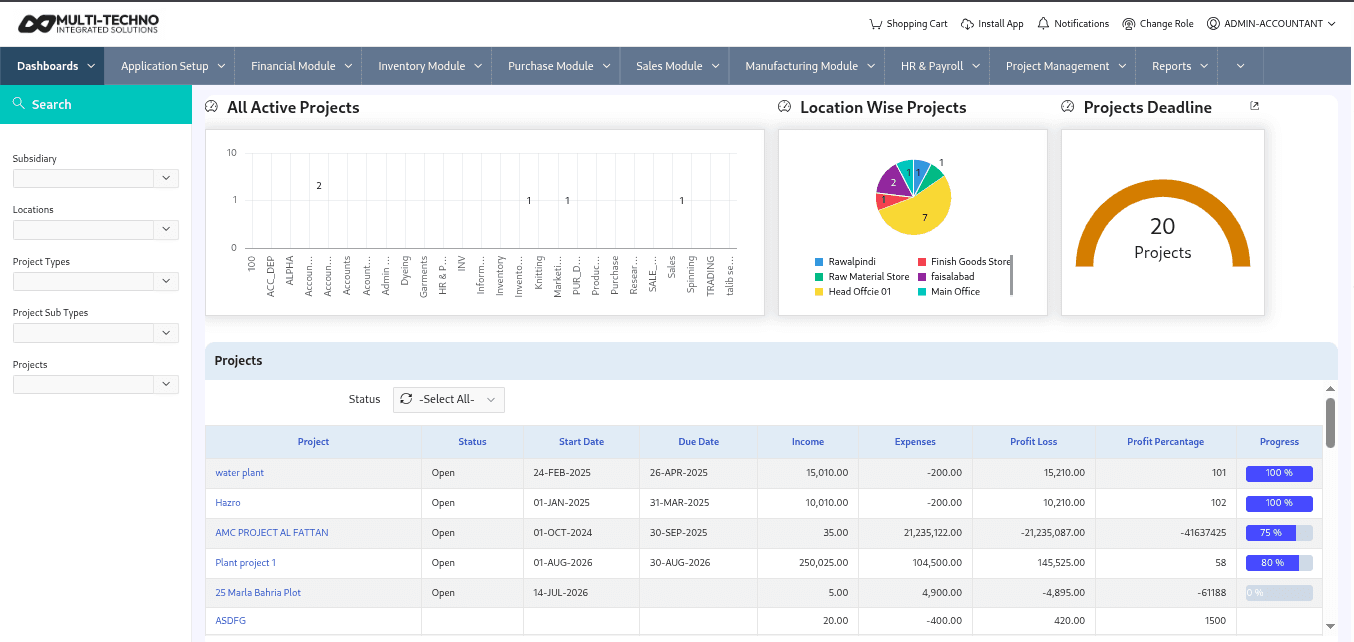
Create the project and plan tasks using the project task calendar.
Monitor project task status and BOQ status as work progresses.
Handle pending BOQs for requisition and material issue notes as materials are needed.
Analyze project transaction, trial balance, profit/loss, expense, and income reports.
Keep inventory operations structured with tools designed to support everyday stock control, movement, valuation and reporting.
Create and organize projects with a dedicated project task calendar.
Monitor project task status to keep work visible and on schedule.
Track project BOQ status throughout the project lifecycle.
Convert pending BOQs into requisitions or material issue notes as work requires.
Review a dedicated trial balance for each individual project.
See profit or loss calculated specifically for each project.
Monitor project-wise expenses as they are incurred.
Track project-wise income alongside expenses for a complete financial picture.
Plan, schedule, and track project work and material needs.
Review the financial performance of every project in detail.
Explore the industries and ERP modules that work alongside inventory management.
Industry-specific inventory use cases

Construction Management, Real Estate Management, Project Management
The real estate and construction industry is one of the most complex and fast-moving sectors, where every project depend...

Construction Management, Project Management, Document Management, Asset Management
How Construction ERP Software Streamlines Modern Construction OperationsThe construction industry operates in one of the...

Project Management
Successful projects are built on careful planning, effective collaboration, and timely execution. However, as businesses...
The Project Management module covers project setup, task scheduling, task and BOQ status tracking, requisitions from BOQ, and detailed project-wise financial reporting.
Yes. Project BOQ status is tracked throughout the project, with pending BOQs convertible into requisitions or material issue notes.
Yes. Reports include project trial balance, profit/loss, expenses, and income, each calculated specifically for the individual project.
Yes. A project task calendar and task status tracking are available to keep project work visible and on schedule.
Yes. Pending BOQs can be converted into requisitions or material issue notes as project work requires materials.
Yes. For managing leads, customers, and quotations, Multi-Techno offers a dedicated CRM module that works alongside Project Management.
Yes. The project profit/loss report calculates financial performance specifically for each individual project.
Project-wise expenses and income are tracked specifically at the project level, giving focused visibility alongside your broader accounting records.
Explore Multi-Techno CRM for leads, quotations, and customer relationship management.
Fill out the form below and we'll be in touch shortly.