Is Your Manufacturing ERP Structured Like Your Factory?
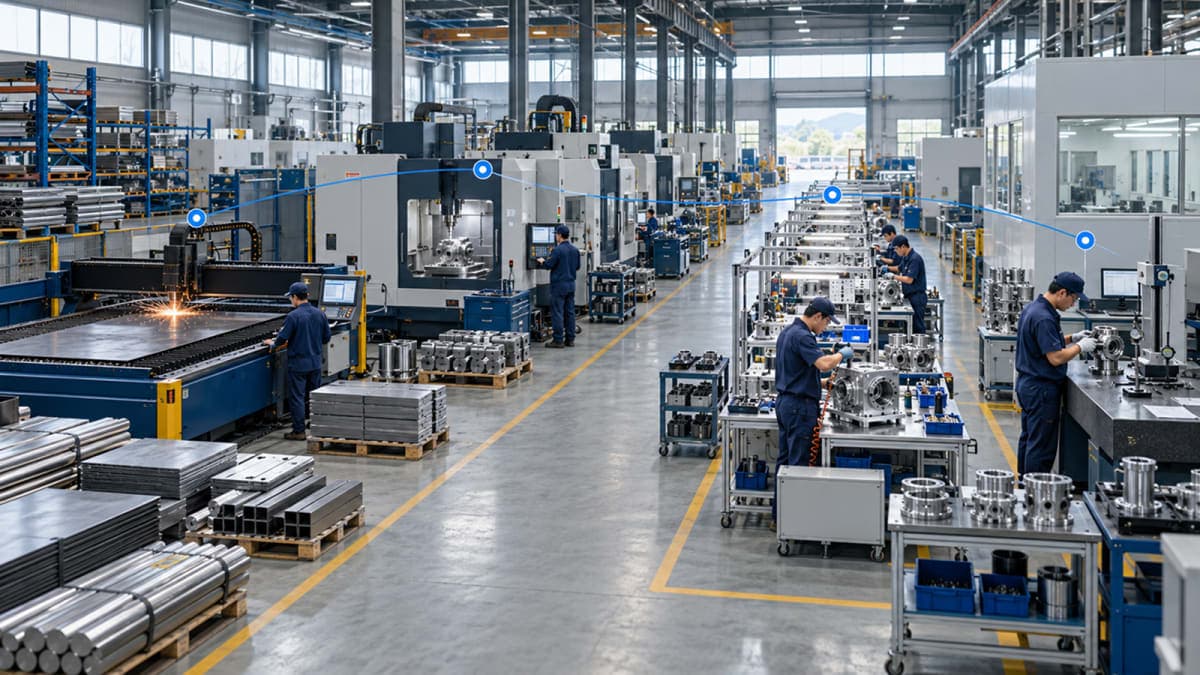
A manufacturing ERP should reflect how production actually happens on the factory floor. If departments, machines, production areas, and resources are structured differently in the ERP, work orders, routing, production tracking, and reporting can become difficult to manage.
The question is not simply whether an ERP has a work center feature. The more important question is whether the system can represent the way your factory is actually organized.
What Is a Work Center in Manufacturing ERP?
A work center represents a specific production area, machine group, or operational point where manufacturing activities take place.
For example, a factory producing metal components might have separate work centers for:
Cutting
Drilling
Welding
Painting
Assembly
Each work center can represent a stage where a particular production operation is performed.
This becomes important when production processes are mapped inside an ERP. A manufacturing routing can define the sequence of operations, while work centers identify where those operations are performed.
For example:
Cutting → Drilling → Welding → Painting → Assembly
The routing defines the production sequence. The work center structure connects those operations to the actual production resources available in the factory.
This allows the ERP to represent more than just a list of production steps. It can reflect where those steps actually happen.
What Is an Entity Group in Manufacturing ERP?
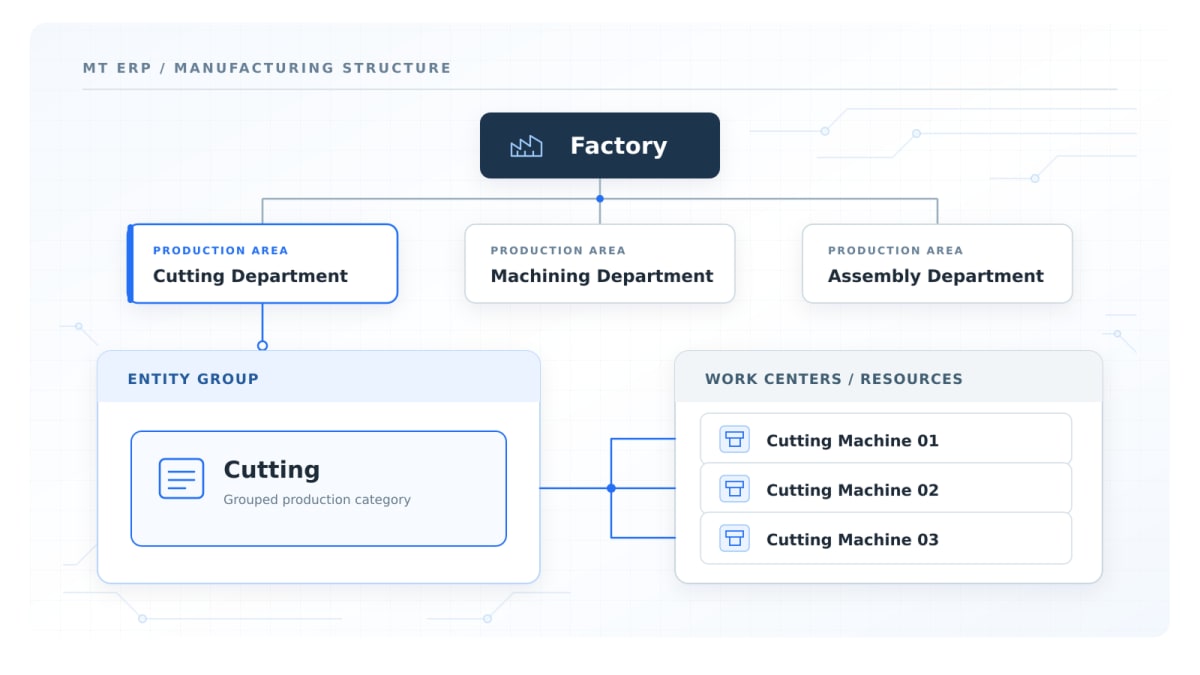
The term Entity Group is not used identically across every ERP system. In Multi-Techno's manufacturing setup, it can be used to organize related production resources, departments, or operational areas within the broader factory structure.
For example, a factory could organize its production environment around groups such as:
Cutting Department
Machining Department
Assembly Department
Finishing Department
Within these groups, individual work centers or machines can represent more specific production resources.
This creates another level of structure between the overall factory and individual production operations.
A simplified structure could look like:
Factory → Entity Group → Work Center → Operation
For a smaller factory, this level of organization may be relatively simple. For a larger operation with multiple departments, lines, or production resources, the additional structure can become much more useful.
Work Center vs Entity Group: What Is the Difference?
Work centers and entity groups can serve different purposes within a manufacturing structure.
Work Center | Entity Group |
|---|---|
Represents a specific production area or resource | Groups related production resources or areas |
Closely connected with production operations | Provides a broader organizational structure |
Can represent a machine group or operational point | Can represent a department or production area |
Helps identify where an operation takes place | Helps organize related work centers |
More operational in nature | More structural in nature |
The distinction becomes particularly useful when a factory grows beyond a simple production line.
For example, instead of treating every machine as an isolated resource, a manufacturer can organize related resources under a broader production area and then connect individual work centers to the operations performed there.
Why Factory Structure Matters Before ERP Implementation
ERP implementation often focuses on data, modules, users, and workflows. But manufacturing businesses have another important requirement: the ERP structure needs to match the physical production environment.
Before configuring manufacturing, businesses should understand:
How many production departments exist?
Which machines belong to each area?
Which operations are performed at each location?
Are there multiple production lines?
Can the same operation happen at different work centers?
Which resources have different capacities?
Which production steps are shared between products?
Where does material move between operations?
If these questions are unclear, the ERP may be configured around assumptions instead of the actual production process.
That can create problems later when production teams start using work orders, routing, material consumption, and production reports.
How Factory Structure Changes With Production Complexity
Not every factory needs the same level of production structure.
Simple Production Line
Consider a manufacturer producing one main category of product through a relatively straightforward process:
Cutting → Machining → Assembly → Finishing
In this case, each stage could correspond to a work centers and machine centers.
The structure remains easy to understand because there are fewer production paths and fewer shared resources.
Multiple Departments and Production Lines
A larger factory may have several production lines, departments, and machines serving different products.
For example:
Production Line A
Cutting
Welding
Assembly
Production Line B
Cutting
Machining
Assembly
Finishing Department
Painting
Inspection
Packaging
Here, the ERP needs to distinguish between operations that may look similar but use different resources, capacities, or production paths.
This is where a more structured combination of entity groups, work centers, machines, and routing becomes useful.
The goal is not to make the ERP structure complicated. The goal is to make it accurately represent the factory.
How Work Centers Connect With Manufacturing Routing
A manufacturing routing describes the sequence of operations required to produce a product.
For example:
Operation | Work Center | Activity |
|---|---|---|
10 | Cutting | Cut raw material |
20 | Machining | Machine components |
30 | Welding | Join components |
40 | Painting | Apply finish |
50 | Assembly | Assemble final product |
The routing provides the sequence. The work center provides the production location or resource associated with each operation.
This connection matters because production is not only about what needs to happen. It is also about where, and through which resource, it happens.
A routing without a meaningful work-center structure may describe the process but provide less visibility into the actual production environment.
How Work Centers and Entity Groups Feed Into Work Orders
Once the factory structure and production routing are defined, they can become part of the work-order process.
A simplified flow could be:
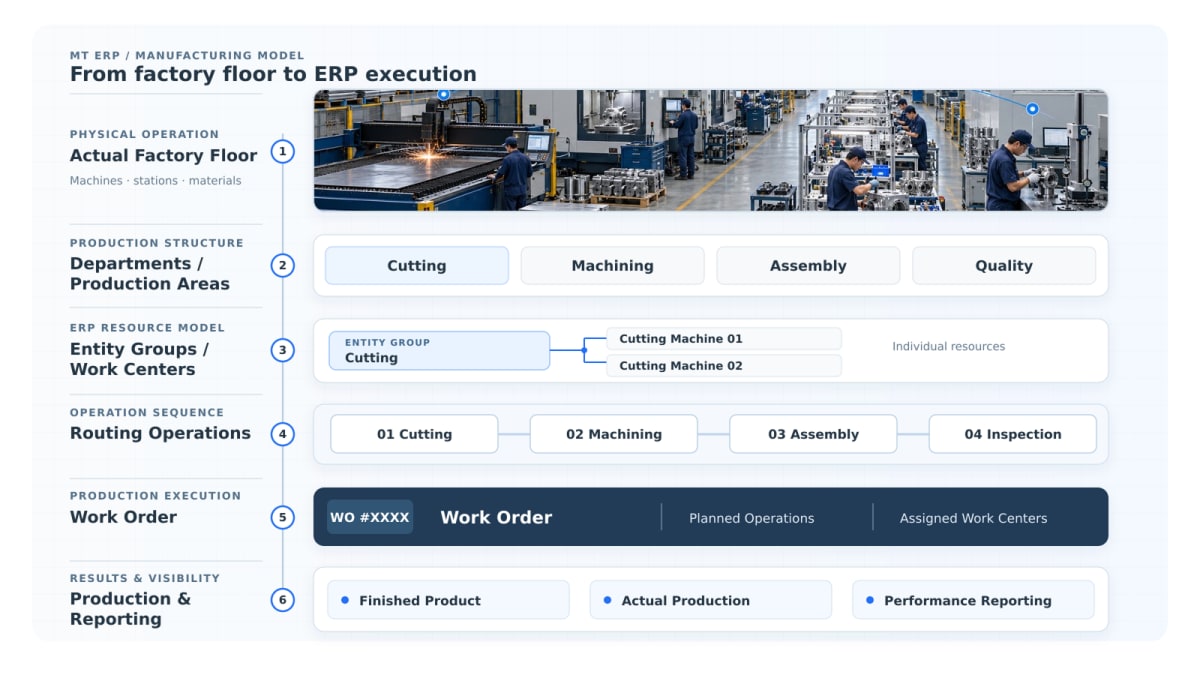
BOM → Routing → Work Center → Work Order → Production → Reporting
The Bill of Materials (BOM) defines the materials and components required for the product.
The routing defines the operations and sequence.
The work-center structure identifies where those operations are performed.
The work order then brings these elements together for actual production.
For example, when a work order is created for a finished product, the system can use the defined production structure to identify the required materials, operations, and production resources.
This creates a connection between the product definition and what happens on the shop floor.
Multi-Techno's Production Management setup brings these manufacturing elements together through manufacturing setup, routing, work centers, machines, BOMs, work orders, and production reporting.
How Factory Structure Affects Production Reporting
Production reporting becomes more meaningful when the ERP understands how the factory is organized.
Instead of simply recording that a product was manufactured, the system can associate production activity with defined operations and resources.
Depending on the manufacturing setup, businesses may need visibility into areas such as:
Production output
Material consumption
Work-order progress
Route-wise production
Resource utilization
Production capacity
Downtime
Planned versus actual production
For example, if one production area consistently becomes a bottleneck, the issue becomes easier to investigate when production activity is properly connected to work centers and operations.
The value of the structure is therefore not limited to initial ERP configuration. It can influence the quality of production information available later.
Work Centers, Entity Groups and Downtime
Downtime is another area where production structure becomes important.
If a machine or production resource stops, the business needs to know more than the fact that production was delayed.
It may need to identify:
Which production area was affected?
Which work center was involved?
Which machine stopped?
Which operation was interrupted?
How long was production affected?
Which work orders were impacted?
A properly structured manufacturing ERP provides the foundation for connecting this information to the relevant production resources.
Without that structure, downtime data can remain disconnected from the actual production process, making it harder to analyze recurring production interruptions.
How Multi-Techno Handles Manufacturing Setup
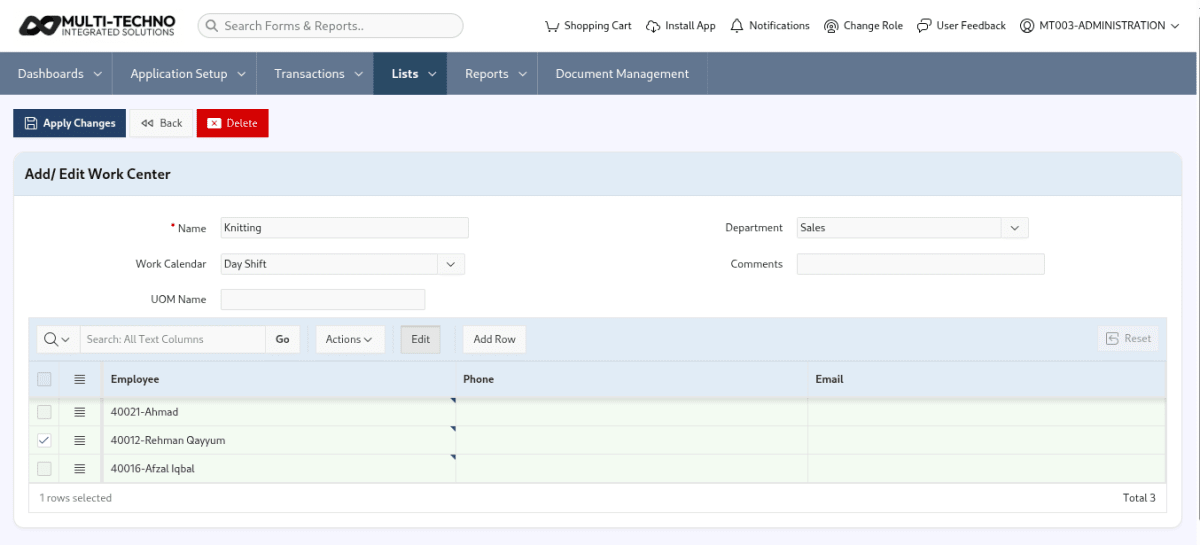
Manufacturing setup in Multi-Techno's Production Management module is designed around the actual components that define a production environment.
This includes:
BOM → Routing → Work Centers → Machines → Work Orders → Production Reporting
The setup can support both discrete and process manufacturing environments while connecting production planning with shop-floor activities.
For a manufacturer, this means the ERP structure can be built around the way production is organized rather than treating every factory as if it follows the same model.
The practical objective is straightforward: define the factory structure first, then use that structure to manage production more consistently.
How to Map Your Factory Before Setting Up ERP
Before configuring a manufacturing ERP, it helps to document the production floor in a simple structure.
Area to Map | Questions to Ask |
|---|---|
Departments | What production departments exist? |
Production Lines | How many separate lines operate? |
Work Centers | Where does each production operation happen? |
Machines | Which machines are assigned to each area? |
Operations | What activities are performed at each work center? |
Capacity | What production capacity does each resource have? |
Routing | In what sequence does the product move? |
Work Orders | Which production information needs to be generated? |
Reporting | What production data needs to be monitored? |
This exercise can reveal inconsistencies before they become ERP configuration problems.
For example, if the same operation is performed on three different machines, the implementation team should determine whether those machines should be treated as separate work centers, grouped under a broader production area, or handled through another resource structure.
The answer depends on how the factory actually operates.
Should Every Factory Use the Same ERP Structure?
No two manufacturing businesses necessarily organize production in exactly the same way.
A small manufacturer may have a handful of production areas and a simple routing structure.
A larger manufacturer may have:
Multiple factories
Multiple production lines
Shared machines
Department-level resources
Different production routes
Product-specific operations
Different capacity constraints
An ERP should therefore adapt to the manufacturer's manufacturing processes rather than forcing every business into an identical production template.
This is also why manufacturing setup should be discussed during ERP implementation rather than treated as a generic configuration step.
What to Look for in Manufacturing ERP Work Center Setup
When evaluating manufacturing ERP software, the question should go beyond whether the system has a work-center field.
Consider asking:
Can work centers reflect the actual production floor?
Can multiple work centers be organized into broader production groups?
Can machines be connected with production operations?
Can routing define the correct sequence of operations?
Can work orders use the defined production structure?
Can production capacity be considered?
Can production reporting be analyzed by operation or resource?
Can the structure support additional production lines as the factory grows?
A manufacturing ERP should not only record production after it happens. The same structure should also support production planning and scheduling, particularly when machine capacity, production demand, and resource availability affect how work is planned.
That foundation becomes important when production planning, work orders, resource allocation, and reporting are connected later.
The Relationship Between BOM, Routing and Factory Structure
BOM, routing, and factory structure describe different parts of the same manufacturing process.
Component | Main Purpose |
|---|---|
BOM | Defines materials and components required |
Routing | Defines production operations and sequence |
Work Center | Identifies where an operation takes place |
Machine | Identifies the specific production resource |
Work Order | Brings production requirements into an executable order |
Consider a simple example.
A manufacturer produces a metal cabinet.
The BOM defines the steel sheets, fasteners, paint, and other required components.
The routing defines:
Cutting → Bending → Welding → Painting → Assembly
The work-center structure identifies where these operations are performed.
The work order then brings the material and production requirements together for the actual manufacturing process.
This relationship is important because manufacturing ERP is not simply a collection of separate features. These components need to work together around the same production process.
A Factory-First Approach to ERP
A manufacturing ERP implementation is easier to understand when its ERP manufacturing workflow is connected to the factory itself.
Instead of beginning with:
“Which ERP fields do we need to fill?”
A better starting point is:
“How does our production actually work?”
From there, the business can identify:
Factory Structure → Production Areas → Work Centers → Machines → Operations → Routing → Work Orders → Reporting
This approach helps connect ERP configuration with the physical and operational reality of the manufacturing environment.
The objective is not to create the most complicated ERP structure.
It is to create the structure that accurately represents the production process and remains useful as the business grows.
Frequently Asked Questions
What is a work center in manufacturing?
A work center represents a production area, resource, or operational point where a manufacturing activity takes place. It helps connect production operations with the resources used to perform them.
What is a work center in ERP?
A work center in ERP is used to represent where a manufacturing operation is performed. Depending on the system, it may represent a machine, machine group, production area, or another defined production resource.
What is the difference between a work center and an entity group?
A work center is generally closer to the operational level, while an entity group can provide a broader organizational structure for related production resources or areas. The exact terminology and functionality depend on the ERP system.
Why are work centers important in manufacturing ERP?
Work centers help connect production operations with the actual resources and areas where those operations take place. This can improve the structure of work orders, production planning, and production reporting.
Can one factory have multiple work centers?
Yes. A factory can have multiple work centers based on its departments, machines, production lines, or manufacturing operations.
How do work centers connect with manufacturing routing?
Routing defines the sequence of manufacturing operations, while work centers identify where those operations are performed. Together, they create a more complete representation of the production process.
Do work centers affect production reporting?
They can. When production activity is connected to defined work centers and operations, businesses can analyze production information at a more detailed resource or operational level.
Should a manufacturing ERP use the same structure for every factory?
Not necessarily. Manufacturing environments differ in their departments, machines, production lines, operations, and capacity requirements. ERP structure should therefore reflect the actual production model of the business.
Final Thoughts
A manufacturing ERP should not exist separately from the factory it is managing.
If the physical production environment has departments, machines, work centers, production lines, and defined operating sequences, the ERP should be able to represent those relationships clearly.
Work centers and entity groups are therefore not simply configuration fields. They can form part of the foundation that connects manufacturing operations with routing, work orders, production reporting, and future production analysis.
The right starting point is simple:
Understand the factory first. Then structure the ERP around it.
Want to Map Your Factory Before Choosing an ERP?
Explore Multi-techno Mnaufacturing ERP capabilities and see how your departments, work centers, machines, routing, BOMs, and work orders can be structured around your actual production process.