How a Bill of Materials (BOM) Improves Manufacturing Costing Accuracy
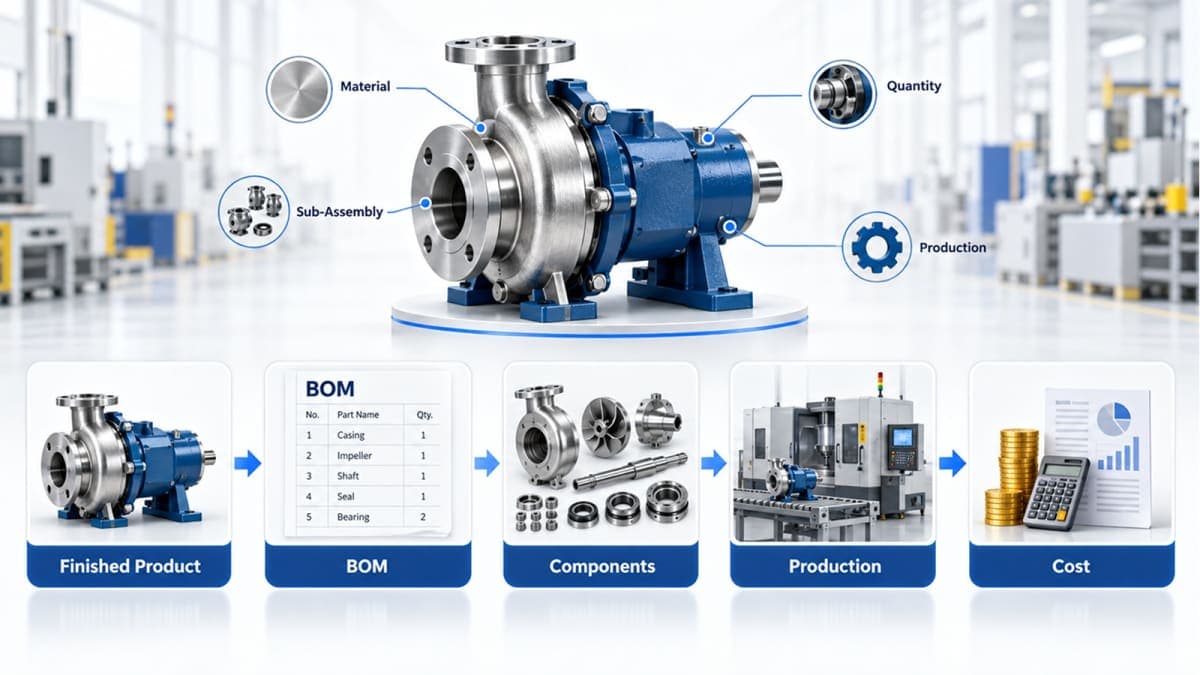
A Bill of Material (BOM) defines the materials, components, quantities and sub-assemblies required to manufacture a product. Because production planning and material requirements depend on this structure, an inaccurate BOM can lead to incorrect material planning and less reliable product costing.
When BOM management is connected with production, inventory and purchasing through a manufacturing ERP, manufacturers can maintain a clearer link between what a product should consume and what the factory actually consumes.
What Is a Bill of Materials (BOM) in Manufacturing?
A Bill of Materials is a structured list of the materials, components and sub-assemblies required to manufacture a finished product.
In simple terms, a BOM answers one fundamental manufacturing question:
What exactly is required to make this product?
For a simple manufactured item, the BOM might look like:
Component | Quantity | Unit |
|---|---|---|
Steel Sheet | 5 | kg |
Motor | 1 | piece |
Bearing | 2 | pieces |
Cable | 3 | meters |
Fasteners | 8 | pieces |
For a more complex product, some components may themselves be manufactured from several other materials. That creates a multi-level BOM.
The BOM therefore becomes more than a simple parts list. It provides the material structure that production planning, purchasing, inventory and costing processes can work from.
This becomes particularly important when a manufacturer has many products, multiple production stages, changing material costs or sub-assemblies.
Why BOM Accuracy Matters for Manufacturing Costing
Manufacturing costing does not start when the finished product reaches the warehouse.
It starts with understanding what the product requires.
Imagine a manufacturer produces a machine and the BOM states that it requires 10 kg of a particular raw material.
If the actual requirement is 12 kg, the planned material requirement is already wrong.
Now consider another situation. The quantity is correct, but the material price being used for costing is outdated.
The BOM structure may be correct, but the expected material cost may still be different from the current purchasing reality.
This is why BOM accuracy and cost information need to be considered together.
Common BOM problems include:
Incorrect component quantities
Missing components
Outdated material information
Incorrect units of measure
Incorrect sub-assembly relationships
Old product revisions
Uncontrolled changes
Incomplete wastage or scrap considerations
A BOM does not automatically eliminate every manufacturing costing problem. Labor, machine time, overhead, subcontracting and other production costs may also affect total production cost.
But the BOM provides the material structure from which a significant part of manufacturing cost analysis can begin.
How a BOM Supports Manufacturing Costing
A simplified BOM material-cost calculation is:
Required Quantity × Applicable Material Cost = Expected Material Cost
For example:
Component | Required Quantity | Cost per Unit | Expected Cost |
|---|---|---|---|
Material A | 10 kg | $4.00 | $40.00 |
Component B | 4 units | $7.50 | $30.00 |
Component C | 2 units | $12.00 | $24.00 |
Total BOM Material Cost | $94.00 |
This gives the manufacturer a structured basis for understanding the material portion of a product's expected cost.
However, there is an important distinction:
BOM material cost is not necessarily total production cost.
Depending on the costing method, total production cost may also include:
Direct labor
Machine time
Production overhead
Setup costs
Subcontracting
Process-related costs
Scrap or wastage
Other manufacturing expenses
The BOM establishes what materials are required. The broader production-costing process determines how those materials combine with other manufacturing costs.
This distinction prevents a common mistake: treating the BOM as if it were the entire costing system.
Single-Level BOM vs Multi-Level BOM
Not every product requires the same BOM structure.
A simple product may use a single-level BOM:
Finished Product
→ Motor
→ Housing
→ Cable
→ Fasteners
But a more complex product may contain a separately manufactured sub-assembly:
Finished Product
→ Main Frame
→ Control Unit
→ Drive Assembly
Drive Assembly
→ Motor
→ Gear Set
→ Bearings
→ Housing
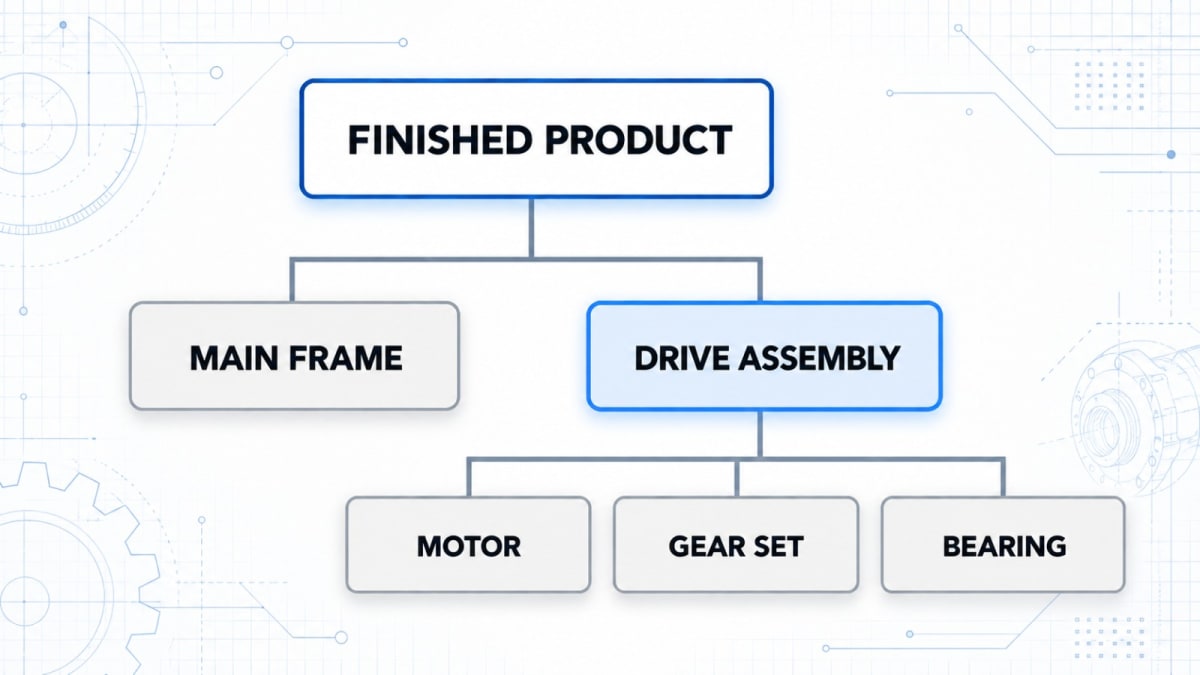
This is a multi-level BOM.
A multi-level BOM is useful when a finished product contains sub-assemblies that have their own materials or components.
The important thing is not simply having more levels.
The BOM should reflect how the product is actually manufactured.
Discrete vs Process Manufacturing
The way BOM information is used can also differ depending on the manufacturing model.
Area | Discrete Manufacturing | Process Manufacturing |
|---|---|---|
Production model | Individual units or assemblies | Continuous or batch-oriented production |
Typical output | Machines, equipment, assembled products | Chemicals, food, liquids, processed materials |
BOM role | Defines components and assemblies | Defines materials consumed in the process |
Production tracking | Work orders and assembly activities | Work progress and material consumption |
Common measurement | Pieces / units | Weight, volume, batch or other process units |
Example | Industrial machine | Chemical batch |
For manufacturers operating both types of production, the ERP needs to support the appropriate production workflow rather than forcing every factory into one model.
Multi-Techno's Production Management module supports both discrete manufacturing and process manufacturing, with separate work-order and material-consumption workflows.
A Practical BOM Walkthrough: From BOM to Production
The real value of a BOM becomes clearer when it is connected to the production process.
Consider a manufacturer producing a finished machine.
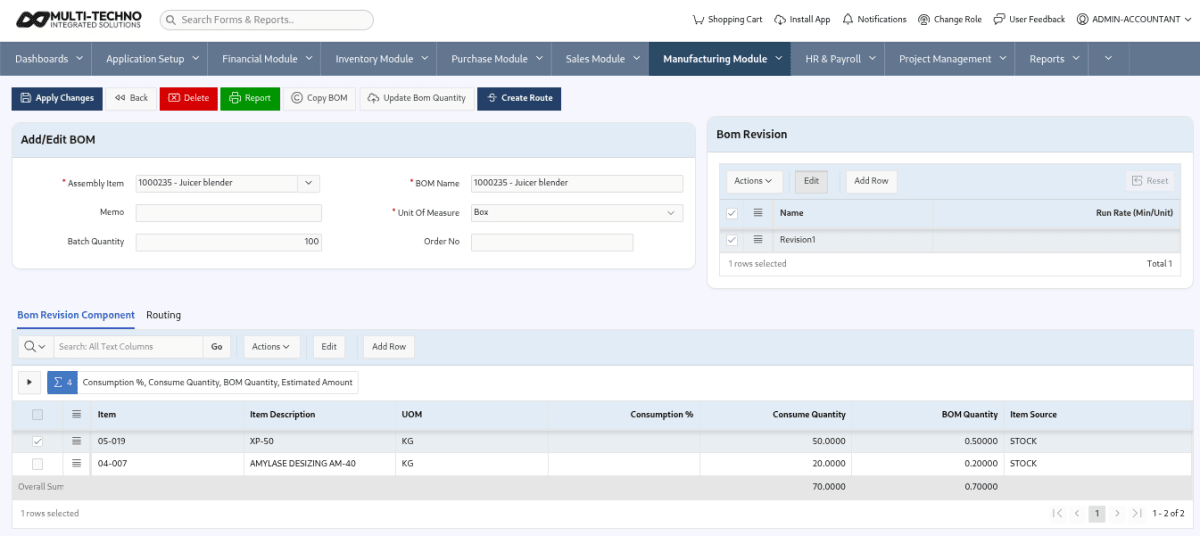
Step 1: Create the BOM
The manufacturing setup defines:
Finished product
Raw materials
Components
Sub-assemblies
Required quantities
For a multi-level product, the BOM can represent the relationship between the finished product and its sub-assemblies.
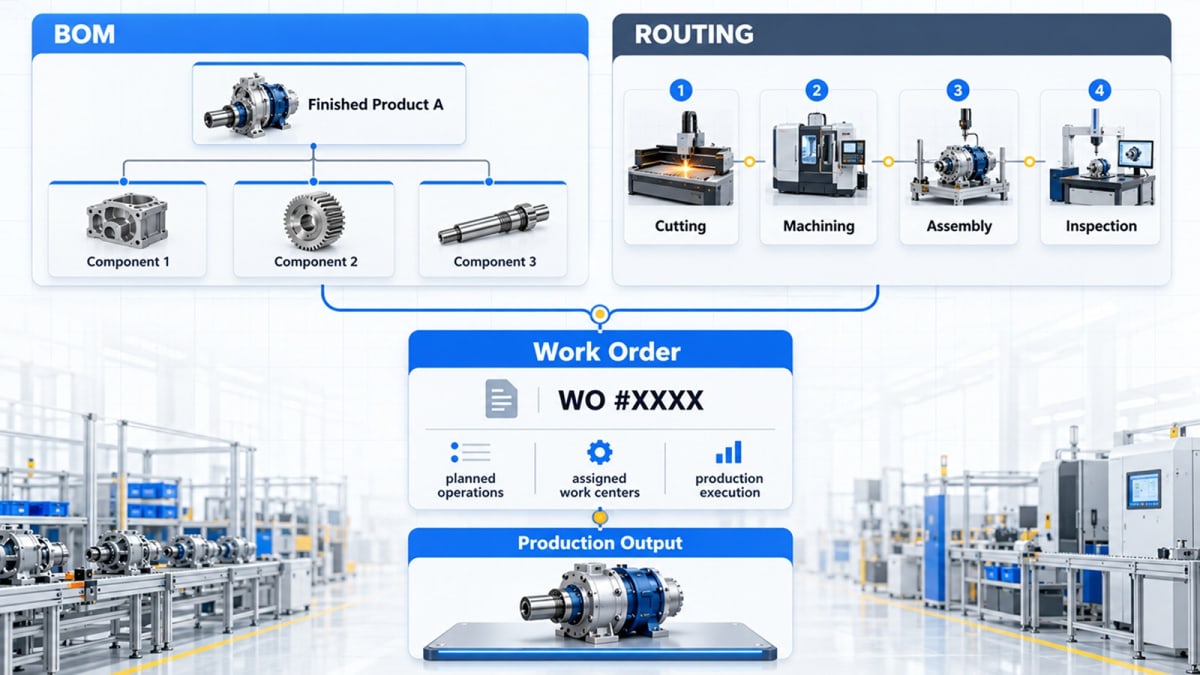
Step 2: Define the Production Route
The manufacturer then defines how the product moves through production.
This can involve:
Work centers
Machines
Production sequence
Manufacturing routing
Step 3: Create the Work Order
The production requirement moves into a work order.
The production team now has a defined product to manufacture rather than relying on a separate spreadsheet to determine the required materials.
Step 4: Check Material Availability
Before production starts, the required materials can be checked against available inventory and planned requirements.
This helps identify material shortages before they become production-floor problems.
Step 5: Record Material Consumption
As production takes place, material consumption is recorded against the production activity.
This creates the important connection between:
What the BOM says should be consumed
and
What production actually consumes.
Step 6: Compare Planned vs Actual Consumption
This is where manufacturing data becomes useful for analysis.
Instead of stopping at the BOM, management can review whether actual material usage matched the planned requirement.
Multi-Techno's Production Management module includes Actual vs. Plan Consumption Summary and Daily Actual vs. Plan Consumption Report for this purpose.
That gives the manufacturer a much more useful question to answer:
Did production consume materials according to the expected production plan?
This is more actionable than simply knowing what materials were entered into the BOM.
What the Actual vs. Plan Consumption Report Tells You
Suppose the BOM expects 100 kg of a material for a production order.
Production actually consumes 108 kg.
The difference is not automatically proof of a problem.
There may be a legitimate production reason:
Process loss
Scrap
Rework
Measurement differences
Product variation
Incorrect BOM quantity
Production-floor issue
But without a planned-versus-actual comparison, the variance can remain hidden.
A consumption report therefore helps the production team investigate why actual usage differs from the expected requirement.
This is one of the important steps between simply maintaining a BOM and actually using manufacturing data to improve cost control.
Want to See the Workflow Live?
If you want to see how BOM setup, work orders, material planning and actual-versus-planned consumption work together in a manufacturing ERP, book a Multi-Techno demo and review the workflow using your own production process.
BOM Errors That Can Quietly Distort Manufacturing Costs
Some BOM problems are immediately visible.
Others only become visible after they affect purchasing, inventory or production.
1. Incorrect Component Quantities
If the BOM requires 10 units but production actually needs 12, material planning starts from the wrong assumption.
Even a small quantity error can become significant when the product is manufactured hundreds or thousands of times.
2. Outdated Material Costs
Material prices can change because of:
Supplier price changes
Currency fluctuations
Market conditions
Purchasing agreements
Changes in sourcing
A correct BOM quantity combined with outdated cost information can still produce an unreliable expected material cost.
3. Missing Components
Some components are easy to overlook because they are inexpensive or used in small quantities.
Individually they may seem insignificant.
Across large production volumes, however, those missing components can become meaningful cost and inventory differences.
4. Incorrect Units of Measure
A component might be purchased in kilograms but consumed in grams, or purchased in meters but used in smaller production units.
Incorrect unit relationships can create large differences in material planning and costing.
5. Product Changes Not Reflected in the BOM
A product changes.
The BOM does not.
Production continues using the older structure.
This creates a particularly difficult problem because the ERP may be following the information correctly — but the information itself is no longer correct.
BOM management therefore needs a clear process for product changes and revisions.
6. Incorrect Sub-Assembly Structure
If a sub-assembly contains its own components but the relationship is not represented correctly, material planning can become disconnected from the actual production method.
For complex products, multi-level BOM management becomes especially important.
Excel BOM vs ERP-Based BOM Management
Excel is not automatically the wrong choice.
For a small operation with:
Few products
Few users
Stable product structures
Limited revisions
Simple production
a spreadsheet may be sufficient.
The problem begins when the manufacturing operation becomes more complex.
Consider a factory with hundreds of products, multiple production orders, changing material prices, several warehouses and frequent product changes.
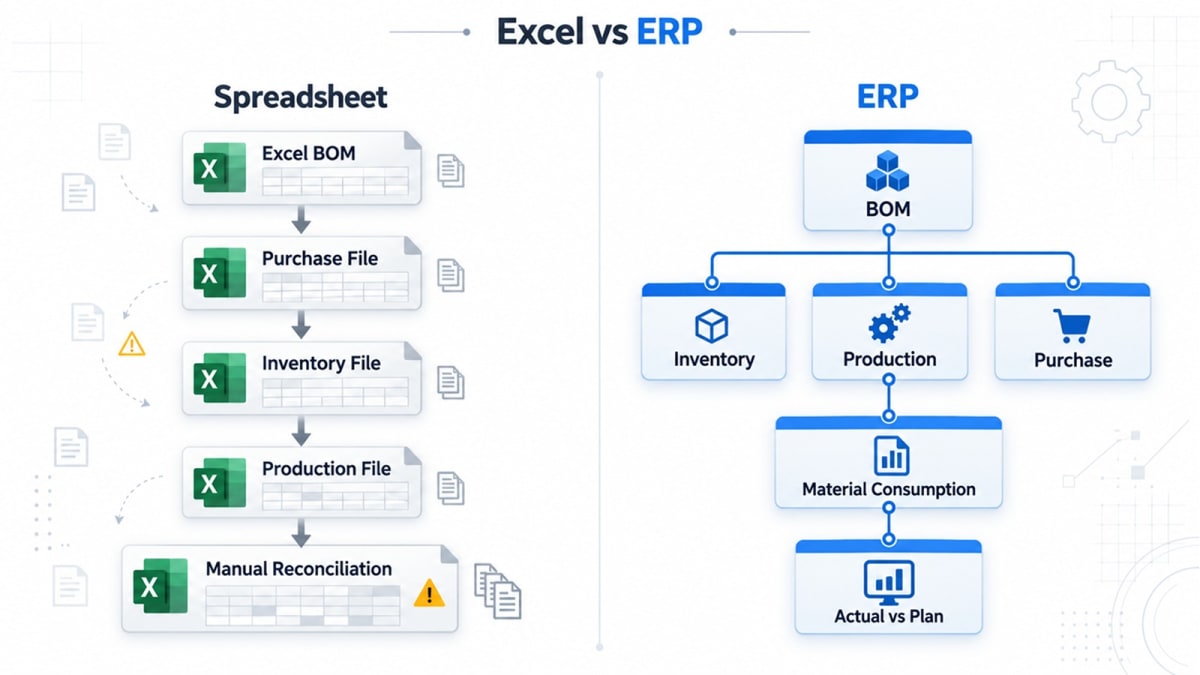
Now the BOM needs to stay connected with:
Purchasing
Production
Material planning
Consumption
Cost analysis
Keeping each of these in separate files creates more opportunities for information to become disconnected.
Quick BOM Management Checklist
Requirement | Spreadsheet Approach | Connected ERP Approach |
|---|---|---|
Basic BOM list | ✓ | ✓ |
Multi-level product structure | Possible, but harder to control | ✓ |
Production integration | Manual | Connected |
Inventory connection | Separate process | Connected |
Material planning | Manual / separate | Connected |
Actual consumption tracking | Manual reconciliation | System-based |
Planned vs actual analysis | Possible with manual work | Built into reporting workflow |
Multiple users and departments | Harder to control | Centralized |
Product changes | Manual version handling | Controlled within system workflow |
Production reporting | Separate files | Integrated reporting |
The objective is not to replace Excel simply because it is Excel.
The objective is to determine whether the current BOM process gives the factory enough control as its products and operations become more complex.
What to Look for in BOM Management Software
A manufacturer evaluating BOM software should look beyond the ability to create a component list.
The more important question is:
What happens to the BOM after it is created?
1. Multi-Level BOM Support
If products contain sub-assemblies, the system should be able to represent those relationships clearly.
2. Production Integration
The BOM should connect with the production workflow instead of remaining an isolated record.
3. Material Planning
BOM information becomes more useful when it can contribute to planning the materials required for production.
4. Inventory Connection
Material requirements and actual consumption should be connected to inventory transactions.
5. Cost Visibility
Manufacturers should be able to understand how required materials contribute to expected product costs.
6. Consumption Analysis
A useful manufacturing system should make it possible to compare planned requirements with actual material usage.
7. Change Management
As products evolve, manufacturers need a controlled way to update the product structure and avoid continuing to manufacture against outdated information.
Where BOM Fits in a Manufacturing ERP
BOM management should not exist as an isolated manufacturing feature.
A connected manufacturing workflow can look like:
Product Definition
↓
Bill of Materials
↓
Material Planning
↓
Purchasing / Inventory Availability
↓
Production Work Order
↓
Material Consumption
↓
Finished Goods
↓
Cost & Production Reporting
This is why BOM becomes increasingly important as a manufacturing business grows.
The production team needs to know what to make.
Purchasing needs to know what materials may be required.
The warehouse needs to know what is available.
Production needs to record what was consumed.
Management needs to understand whether actual usage matches the planned requirement.
A connected ERP brings these related activities into one operational workflow.
From BOM to Shop-Floor Control
A BOM tells the system what is required.
Production routing helps define how the product moves through manufacturing.
The work order defines what needs to be produced.
Material consumption records what was actually used.
Reports then help management understand what happened compared with the plan.
This is the bigger picture manufacturers should consider when evaluating manufacturing ERP software.
Multi-Techno's manufacturing workflow brings together manufacturing setup, BOMs, routing, work centers, work orders, material planning, material consumption and production reporting. The manufacturing solution also distinguishes between discrete and process workflows.
For example, its Production Management module includes Bill of Materials, Discrete Work Order, Process Work Order, Material Planning, Actual vs. Plan Consumption Summary, Daily Actual vs. Plan Consumption Report, and Down Time Report.
That means the BOM is not treated as the end of the process. It becomes part of the wider production-control workflow.
BOM for Different Manufacturing Industries
The exact BOM structure depends on what a business manufactures.
A textile manufacturer may need to manage materials through multiple production stages.
A chemical manufacturer may deal with process-based production and material consumption.
A machinery manufacturer may depend heavily on sub-assemblies and multi-level BOMs.
A steel manufacturer may need strong control over material quantities, stock and production-related costs.
This is why a manufacturing ERP should be evaluated against the actual production model rather than only against a generic feature checklist.
For example, textile manufacturers can explore a dedicated textile ERP workflow when their BOM and production requirements involve textile-specific operations. Multi-Techno provides a separate Textile industry solution covering production, inventory and supply-chain workflows.
How to Check Whether Your BOM Is Ready for Production
Before trusting a BOM for production planning or costing, ask:
BOM Accuracy
Does the BOM match the product currently being manufactured?
Are all required materials included?
Are component quantities correct?
Are units of measure correct?
Are sub-assemblies represented correctly?
Costing
Is the underlying material cost information current?
Can material-cost changes be identified?
Are other production costs being considered separately?
Production
Can the BOM be used directly in production planning?
Can production orders/work orders use the defined product structure?
Can actual material consumption be recorded?
Control
Can planned and actual consumption be compared?
Can product changes be controlled?
Can management investigate material variances?
If several answers are “no,” the issue may not be the BOM alone.
It may be that the BOM is disconnected from the rest of the manufacturing workflow.
The Real Value of BOM Management
A Bill of Materials may look like a simple list of components.
In a real manufacturing process, it can become one of the foundations connecting product structure, material planning, inventory, production and cost analysis.
The objective is not to create a complicated BOM.
The objective is to maintain a product structure that accurately reflects what the factory produces — and then connect that information to the processes that depend on it.
For a manufacturer still managing product structures through spreadsheets or disconnected records, an integrated manufacturing ERP can provide a more controlled way to connect BOMs with production planning, material consumption, inventory and reporting.
If you want to see how this works in practice, book a Multi-Techno manufacturing ERP demo and review your actual production workflow with the team.
Frequently Asked Questions
What is a Bill of Materials in manufacturing?
A Bill of Materials (BOM) is a structured list of the materials, components, quantities and sub-assemblies required to manufacture a finished product. It can support production planning, material requirements, inventory and product-cost analysis.
What is a multi-level BOM?
A multi-level BOM represents a product structure in which the finished product contains sub-assemblies, and those sub-assemblies can contain their own components or materials. It is useful for complex products manufactured through multiple assembly levels.
How does a BOM affect manufacturing costing?
A BOM provides the material quantities and product structure needed to calculate expected material cost. Total production cost may also include labor, machine time, overhead, subcontracting, scrap and other manufacturing costs.
What is the difference between a BOM and a production work order?
A BOM defines what materials and components are required to manufacture a product. A production work order turns a production requirement into an executable manufacturing activity, where materials can be planned, consumed and production progress can be tracked.
Can an ERP compare planned and actual material consumption?
Yes, manufacturing ERP systems can provide planned-versus-actual consumption analysis when BOM, production and material-consumption data are connected. Multi-Techno includes Actual vs. Plan Consumption Summary and Daily Actual vs. Plan Consumption reporting in its Production Management module.
Is Excel enough for BOM management?
Excel can be sufficient for simple manufacturing operations with few products and limited changes. As product structures, revisions, users, production orders and connected inventory processes become more complex, an ERP-based BOM workflow can provide stronger centralization and integration.
What should manufacturers look for in BOM software?
Manufacturers should evaluate multi-level BOM support, production integration, material planning, inventory connectivity, cost visibility, consumption analysis and change-control capabilities rather than evaluating BOM creation alone.
How does BOM connect with manufacturing ERP?
A BOM can serve as the product-material structure within a wider workflow that includes material planning, purchasing, inventory availability, production work orders, material consumption and production reporting.
See BOM and Manufacturing Management in Action
If your factory is still relying on spreadsheets or disconnected records to manage BOMs, material requirements and production costing, the next step is not another generic ERP presentation.
See the workflow using your own products, materials and production requirements.
Book a Multi-Techno Manufacturing ERP Demo and explore BOM management, production planning, work orders, material consumption and manufacturing reporting in one connected workflow.