01
STEPSelect Location
Choose the selling location — product stock and pricing update live for that location.
A fast, location-aware POS built for retail and counter sales — with barcode scanning, live stock status, cash and bank checkout, and a printable GST invoice generated on the spot.
Multi-Techno POS connects your sales counter directly to inventory and accounting — showing live stock and pricing per location, calculating tax and change automatically, and syncing every sale straight into the ERP without manual re-entry.
Live stock and pricing per selected location.
Scan or search products to add to cart instantly.
Automatic tax, discount, and change calculation.
GST-wise sale invoice generated on checkout.
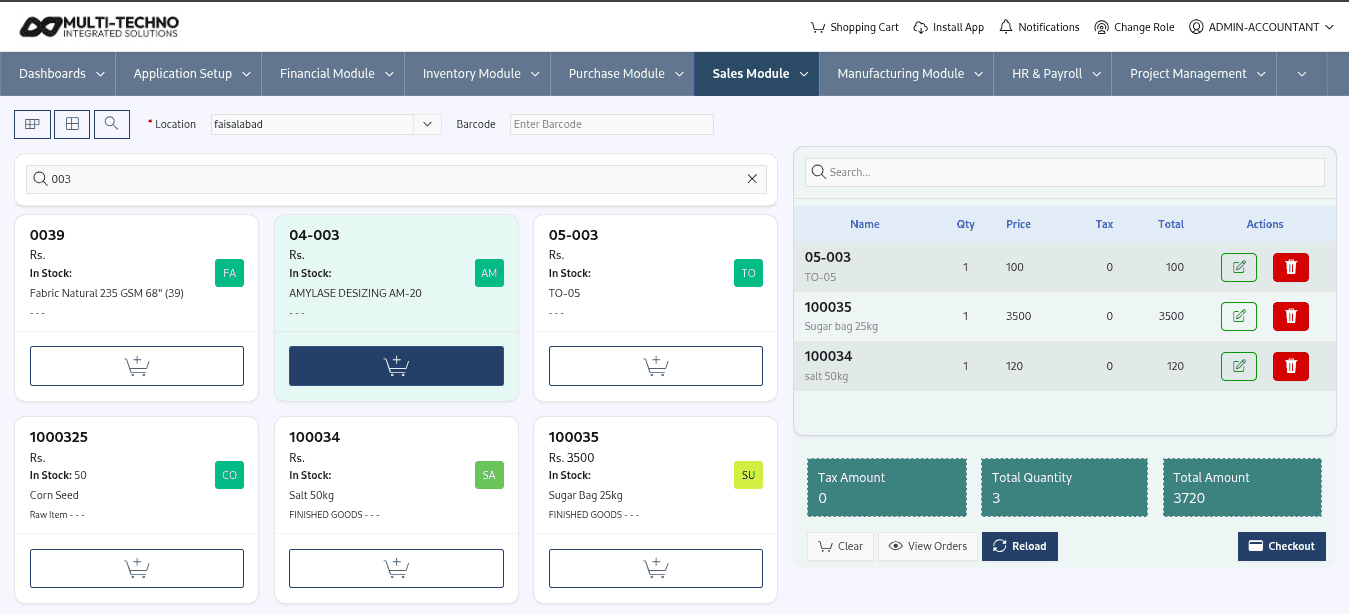
Choose the selling location — product stock and pricing update live for that location.
Add items to the cart by barcode scan or search, with real-time stock status shown on each product.
Confirm quantities, tax, and total, then select the customer, account, and any policy discount.
Enter cash received or pay by bank — change is calculated automatically, and a GST-wise invoice prints on the spot.
Keep inventory operations structured with tools designed to support everyday stock control, movement, valuation and reporting.
Switch between locations, with stock and pricing updating live for each one.
Add products instantly by barcode or quick search, with stock status visible on every item.
Toggle between grid and list product views depending on how your staff prefer to sell.
Quantity, tax, and total amounts update automatically as items are added or edited.
Accept payment by cash or bank, with automatic change calculation on cash sales.
Apply discount policies directly at checkout before finalizing the sale.
Sell to a walk-in customer or select a registered customer and account for the transaction.
Generate a formatted, GST-wise sale invoice the moment checkout is complete.
Everything your counter staff need for a fast, accurate sale.
Explore the industries and ERP modules that work alongside inventory management.
Industry-specific inventory use cases

CRM, Point of Sale
Business growth is not simply about increasing sales. Sustainable growth comes from improving efficiency, reducing opera...

Trading, Point of Sale, Inventory, Sale
Running a modern retail business today requires speed, accuracy, and real-time control over sales and inventory. Custome...

Trading, Point of Sale
Retail businesses operate in a fast-moving environment where customer expectations continue to rise. Shoppers expect qui...
The POS covers location-based product selling, barcode scanning, live cart and tax calculation, cash and bank checkout, discount policies, and printable GST-wise sale invoices.
Yes. Product stock and pricing update live based on the selected selling location.
Yes. Products can be added to the cart by barcode scan or by searching the product name or code.
Payments can be collected by cash or bank. For cash sales, the change (return amount) is calculated automatically based on the amount tendered.
Yes. Policy discounts can be applied directly during checkout before the sale is finalized.
Yes. Sales can be made to a walk-in customer or linked to a registered customer and account.
Yes. A GST-wise sale invoice is generated automatically and can be printed the moment checkout is complete.
Yes. Every POS sale updates stock and financial records directly, keeping inventory and accounting in sync without manual re-entry.
Fill out the form below and we'll be in touch shortly.