How Discrete Manufacturing ERP Handles Work Orders, Assembly Build & Unbuild
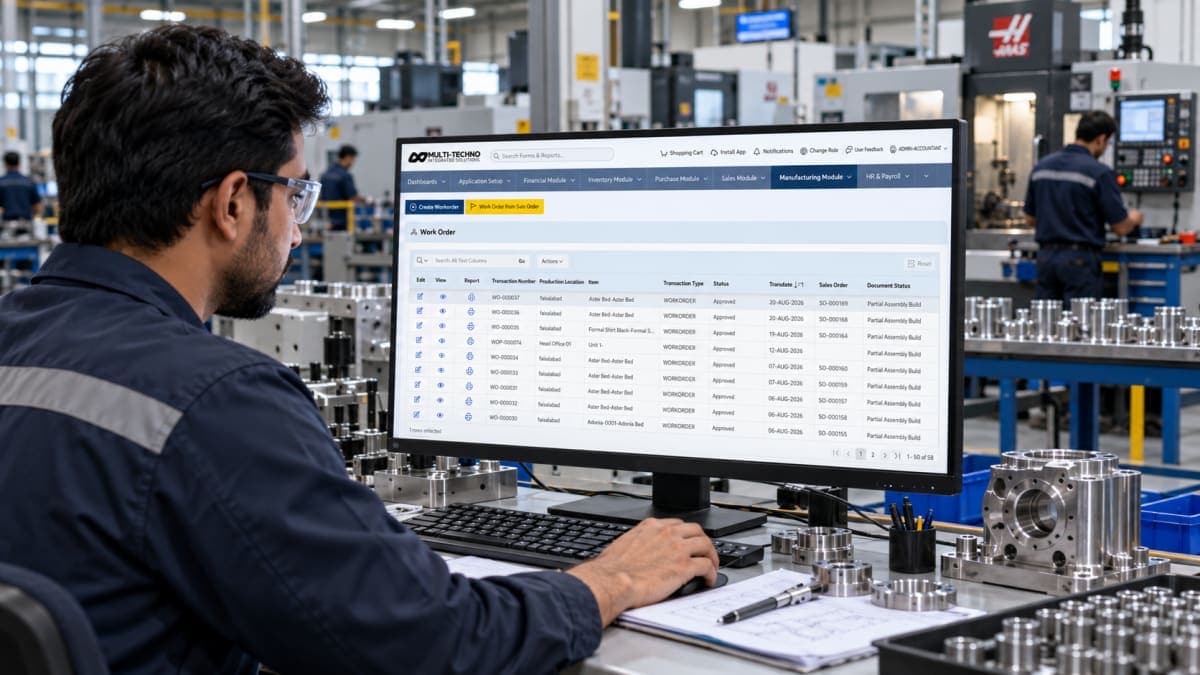
Discrete manufacturing becomes difficult to manage when production requirements, materials, work orders, and finished assemblies are tracked separately.
A sales order may create the need for production, but that requirement still has to move through the factory. Materials need to be planned, production needs to be organized, the work order needs to be tracked, and the completed assembly needs to be recorded correctly.
A discrete manufacturing ERP connects these activities through a structured production workflow. Instead of treating the work order, inventory, and finished product as separate records, the ERP keeps them connected from the production requirement through the finished assembly.
For discrete manufacturers, three activities are particularly important: work orders, assembly build, and assembly unbuild.
How a Discrete Manufacturing Work Order Starts
A discrete production workflow often begins with a confirmed sales requirement.
When a customer order requires a product to be manufactured, the production team needs to turn that requirement into an executable manufacturing job. The production requirement has to be translated into a quantity, product, materials, operations, and other information that the factory can actually work with.
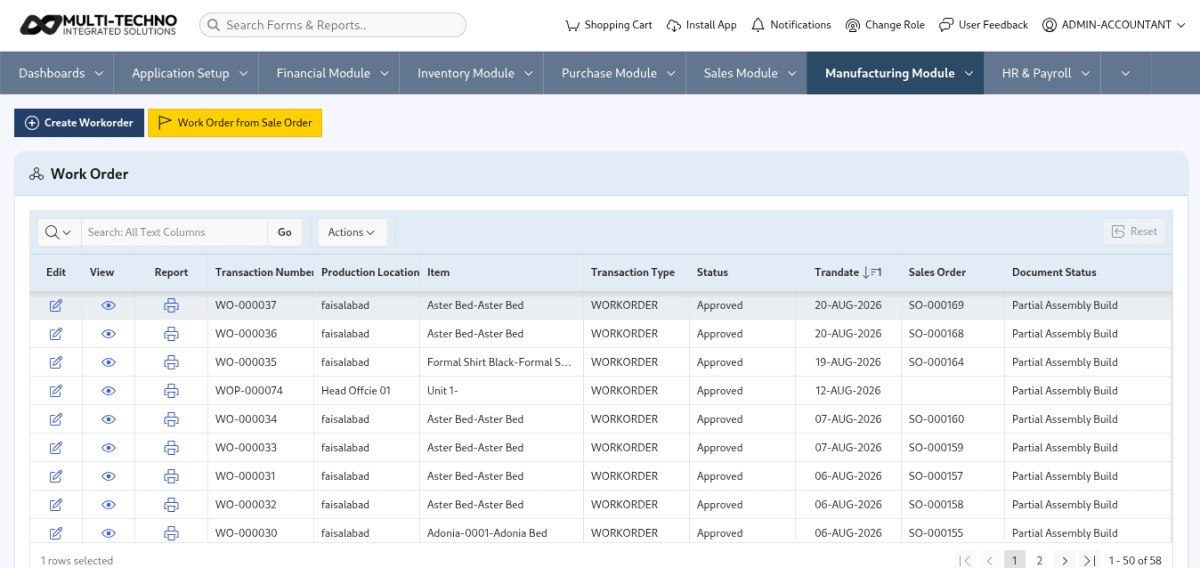
Multi-Techno allows pending sale orders to be converted into discrete or process work orders depending on the manufacturing requirement. This connects the production requirement with the work order rather than requiring production teams to create a completely separate record.
The work order then becomes the manufacturing record through which the production requirement can be planned and executed.
This connection is important because production does not exist independently from demand. When the work order remains connected to the original requirement, production teams have a clearer basis for planning materials, organizing operations, and recording the resulting production.
What a Discrete Manufacturing Work Order Contains
A work order needs enough information to turn a production requirement into an executable manufacturing activity.
Depending on the product and manufacturing process, this can involve the product being manufactured, required quantity, bill of materials, manufacturing routing, work centers, machines, material requirements, and production status.
The Bill of Material (BOM) defines the materials, components, and sub-assemblies required to make the product. It provides the material structure from which production planning and costing can begin.
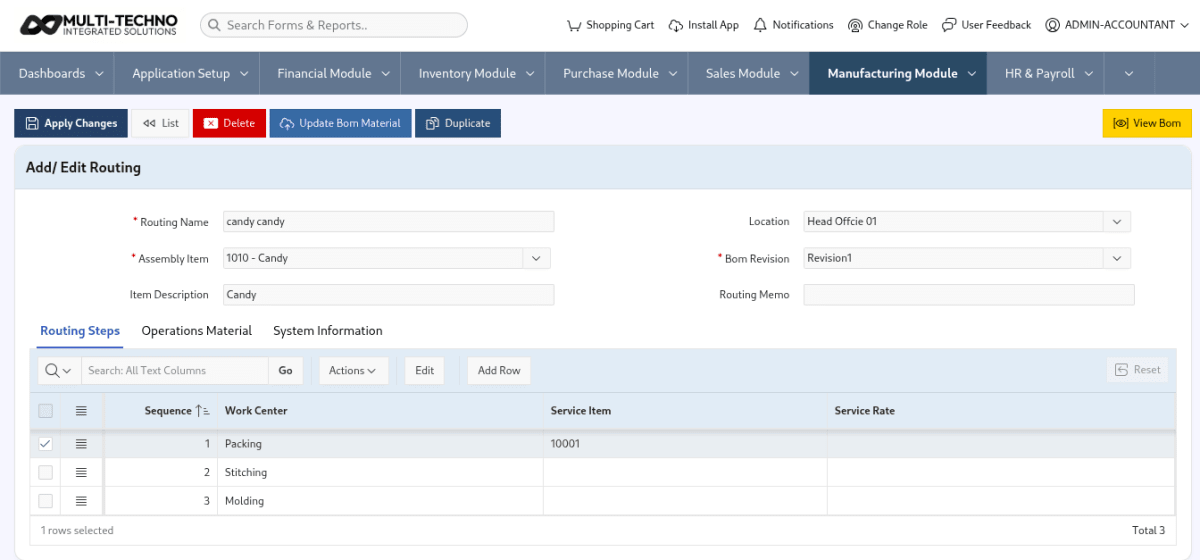
The manufacturing routing defines the operations and sequence required to produce the product. Routing can connect those operations with the relevant production resources.
The work center provide the production structure around where those operations take place.
The work order brings these requirements into the actual production process.
In simple terms, the BOM answers what is required, routing helps define how it is produced, and the work order establishes what production job needs to be executed.
That relationship becomes increasingly important when a product involves multiple operations, machines, work centers, or several levels of components.
How Material Planning Fits Into the Work Order
Creating a work order is only one part of starting production.
The factory also needs to know whether the required materials are available.
Suppose a manufacturer needs to produce 100 metal assemblies. The production requirement may be clear, but production cannot proceed normally if the required steel, fasteners, bearings, electrical components, or other parts are unavailable in the required quantities.
This is why material planning needs to remain connected with the work order.
The production requirement identifies what needs to be made, while material planning determines what is required to make it. When those requirements are connected, the production team can identify material shortages before they become a problem on the shop floor.
Multi-Techno Production Management module supports material planning by sale order and work order, keeping material requirements connected with the production process. Its manufacturing workflow also connects production setup, work orders, material planning, production activity, and reporting within the same module.
A manufacturing ERP can therefore provide more context than a standalone inventory list. Instead of simply showing that a component is out of stock, the production team can understand which manufacturing requirement depends on that material.
Work Orders and Manufacturing Setup Need to Work Together
A work order does not operate in isolation.
Before production begins, the manufacturing system needs the underlying production structure. This can include BOMs, routing, work centers, machines, and the material requirements associated with the product.
For manufacturers building complex products, this structure becomes particularly important because a production job may involve several operations and multiple resources.
A work order without the relevant manufacturing setup may identify what needs to be produced but provide less information about how the factory is expected to produce it.
That is why manufacturing ERP software should connect setup information with production execution rather than treating each function as a separate module.
Multi-Techno's manufacturing workflow starts with manufacturing setup and then moves into work-order planning and production tracking. The Production Management module specifically includes routing, work centers, machines, and BOM setup before production begins.
How Assembly Build Works in Discrete Manufacturing
Once production reaches the point where an assembly has been completed, the ERP needs to record the resulting product.
This is where assembly build becomes important.
Discrete manufacturing generally deals with identifiable products and assemblies made from individual components or materials. A manufacturer may produce an industrial machine, electrical panel, piece of equipment, furniture item, or another assembled product from defined components.
The assembly build process records the resulting assembled product within the production workflow.
For example, a manufacturer producing an industrial machine may use steel components, machined parts, bearings, fasteners, motors, and electrical components. Once those components have been brought together through the manufacturing process, the resulting machine needs to be recognized as the completed assembly.
Assembly build provides that production-side record.
Multi-Techno identifies assembly build as part of its discrete manufacturing workflow alongside work orders and assembly unbuild. This keeps the finished assembly connected with the broader production process rather than treating it as an unrelated stock transaction.
Why Assembly Build Is More Than a Finished-Goods Entry
It may be tempting to think of assembly build simply as the point where a finished product enters inventory.
In an integrated manufacturing ERP, it represents something more useful.
The assembly is the result of a production activity that started with a defined manufacturing requirement. Its record can therefore be connected with the work order, the materials involved, and the production activity that created it.
This gives the manufacturer a clearer production history.
The distinction becomes especially useful when production volume increases. If hundreds or thousands of assemblies are being produced, manually reconciling which work order created which finished product becomes increasingly difficult.
An integrated workflow keeps the production record connected instead of forcing production and inventory teams to reconstruct the relationship later.
When Is Assembly Unbuild Used?
Production does not always move in one direction.
There are situations where an existing assembly needs to be reversed or disassembled. This may happen because of a production correction, rework requirement, incorrect assembly, component recovery, or another manufacturing situation where an existing assembly needs to be taken apart.
This is where assembly unbuild becomes relevant.
The purpose of an unbuild transaction is not simply to delete the original assembly record. It provides a structured way to represent what happened to an existing assembly within the production and inventory process.
For example, if a manufactured assembly needs to be taken apart so that components can be corrected or reused, the ERP needs to represent that change in a controlled manner.
Multi-Techno includes assembly unbuild alongside assembly build within its discrete manufacturing workflow.
Assembly Build and Assembly Unbuild Are Two Sides of the Production Lifecycle
Assembly build and assembly unbuild deal with opposite sides of an assembly's lifecycle.
Assembly build records the creation of an assembled product.
Assembly unbuild deals with the situation where that existing assembly needs to be reversed or disassembled.
The important point is that both activities remain part of the production record.
If an assembly was created and later had to be taken apart, the ERP should have a structured way to represent that change rather than leaving the original production record disconnected from what happened afterward.
This becomes increasingly important when manufacturers need reliable inventory and production records across a large number of work orders.
How Work Orders Connect With Production Tracking
A work order becomes more valuable when the ERP can track what happens after production starts.
The production team may need to understand the status of its work orders, the materials planned for production, the material actually consumed, the progress of production, and the resulting output.
Multi-Techno's Production Management module includes work order status, material planning, actual-versus-plan consumption, downtime, and route-wise production reporting. These functions extend the work order beyond a simple production instruction and turn it into part of a broader production record.
This is important for production managers because the final finished quantity alone does not explain how the production job performed.
A work order can provide the context needed to understand what was planned and how the actual production activity developed.
Why Planned and Actual Consumption Matter
Material planning tells the manufacturer what should be required for a production job.
Actual consumption tells the manufacturer what was used during production.
The difference between those figures can provide useful information about production variance.
For example, if a production job was expected to consume a certain quantity of material but actual consumption was higher, there may be several explanations. The difference could relate to process loss, rework, product variation, an incorrect material requirement, or another production-floor issue.
The important point is that the ERP makes the difference visible.
Multi-Techno provides Actual vs. Plan Consumption reporting within its Production Management module, allowing production teams to compare actual consumption against planned requirements.
This type of comparison is also relevant to broader manufacturing ERP systems. Microsoft describes material and resource consumption as part of the production lifestyle and notes that production systems can report consumption during production and use that information for costing and inventory processes.
The objective is not to assume that every variance means waste. It is to give the manufacturer enough information to investigate meaningful differences.
How Production Reporting Extends the Work Order
A work order tells the production team what needs to be done.
Production reporting helps management understand what actually happened.
This distinction becomes important when a manufacturer has multiple work orders running at the same time. Management may need to identify which jobs are pending, which have progressed, where materials have been consumed, and how production output compares with the original plan.
Multi-Techno's Production Management module includes reports such as Work Order Status, Material Planning SO/WO Wise, Actual vs. Plan Consumption, Daily Actual vs. Plan, Down Time, Daily Production Route Wise, and Route Production Summary.
These reports provide different views of the same production environment.
For example, work order status can help identify the state of production jobs, while actual-versus-plan consumption can highlight material differences. Route-wise reporting can provide another perspective on production activity.
The value comes from having these reports connected to the underlying production records rather than maintaining separate spreadsheets for each type of analysis.
Where Piece-Rate Production Fits In
Some discrete manufacturers track production according to employee output rather than only according to machine or work-order completion.
In those environments, piece-rate information can become part of production management.
For example, a manufacturer may need to record how much production an employee completed during an assembly activity and use that output as the basis for piece-rate calculations.
Multi-Techno's Production Management module includes employee piece-rate tracking for assembly build and work progress activities.
This creates another connection between production records and workforce information. The work order establishes the manufacturing requirement, production activity records the work being completed, and piece-rate tracking can use that production output where the business operates under an employee-based production model.
What to Look for in a Discrete Manufacturing ERP
When evaluating a discrete manufacturing ERP, the question should not simply be whether the software has a work order feature.
The more important question is how the different production functions connect.
A suitable system should be able to connect production requirements with work orders, material planning, BOMs, routing, and the resources used on the shop floor. It should also provide a clear way to record assembly production and handle the relevant unbuild or reversal process.
Production reporting is another important part of the evaluation.
A system may have work orders, but if management cannot easily review their status or compare planned and actual production information, the work order alone provides limited visibility.
The same applies to material planning. A system that records inventory but cannot connect material requirements with a specific production job leaves production teams to bridge that gap manually.
For manufacturers that use employee-based production compensation, piece-rate support can also matter. In that case, the ERP should be evaluated on whether production activity can remain connected with employee output.
The right manufacturing ERP is therefore not necessarily the one with the longest feature list. It is the one whose production functions reflect how the factory actually operates.
Why Work Orders, Assembly Build and Unbuild Need to Work Together
Each of these functions solves a different part of discrete production.
The work order brings the production requirement into the manufacturing process.
Assembly build records the resulting assembled product.
Assembly unbuild provides a structured way to deal with an existing assembly when it needs to be reversed or disassembled.
When these activities are disconnected, production teams may have to maintain separate records to understand what was ordered, what was produced, and what happened to an existing assembly.
When they remain connected through the ERP, the production record can follow the job through its different stages.
That connection becomes particularly useful as production volume increases and manual tracking becomes harder to maintain.
How an Integrated ERP Changes the Production Record
The biggest difference between a collection of manufacturing tools and an integrated manufacturing ERP is the relationship between records.
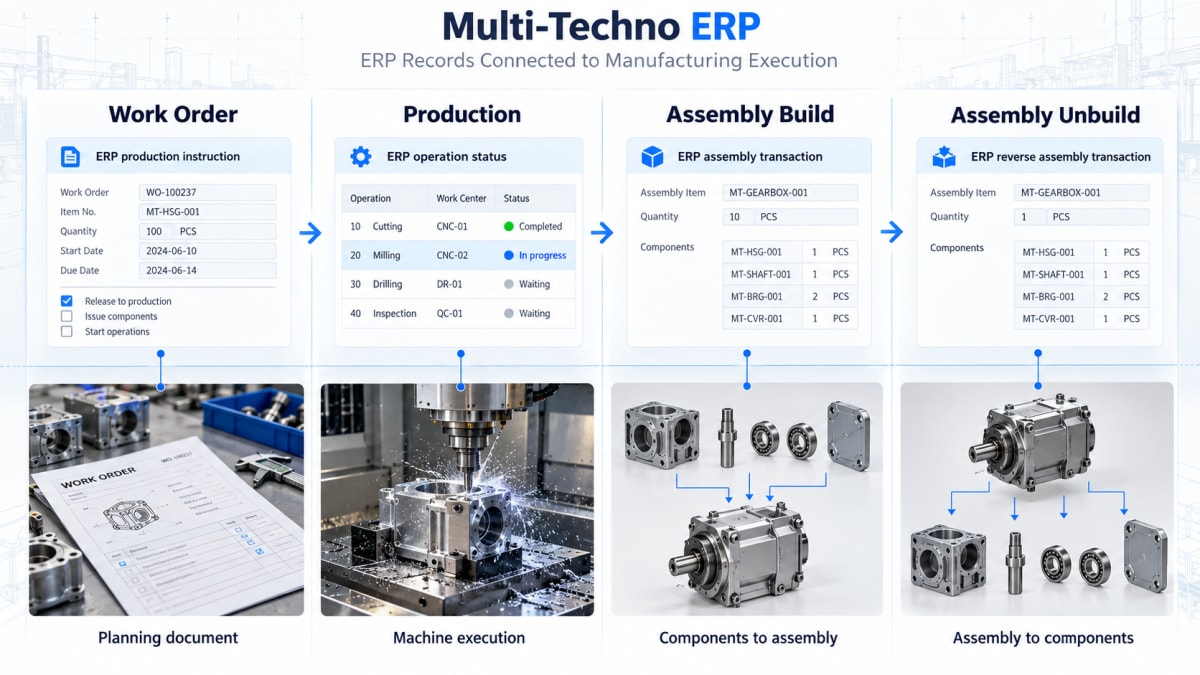
A sales requirement can lead to a work order.
The work order can connect with material planning and manufacturing setup.
Production activity can result in an assembly build.
If the assembly later needs to be reversed, assembly unbuild can represent that change.
Production reporting can then provide management with information about the work order, materials, output, downtime, and other production activity.
This connected structure gives the manufacturer a more complete production history.
It also reduces the need to reconstruct production information from separate records after the job has already been completed.
For manufacturers looking to understand the broader role of ERP across production, inventory, procurement, and financial processes, the guide on ERP System in manufacturing provides additional context.
Frequently Asked Questions
What is a discrete manufacturing work order?
A discrete manufacturing work order is a structured production requirement used to manufacture an identifiable product or assembly. It can contain information about the product, quantity, materials, routing, and other production requirements.
How does a work order start from a sales order?
In a connected ERP workflow, a confirmed sales requirement can be converted into a production work order when the product needs to be manufactured. Multi-Techno supports converting pending sale orders into discrete or process work orders as part of production planning.
What is assembly build in manufacturing ERP?
Assembly build records the production of an assembled product from its required components or materials as part of the discrete manufacturing workflow.
What is assembly unbuild?
Assembly unbuild is used to handle the reversal or disassembly of an existing assembly according to the ERP's production and inventory process.
What is the difference between assembly build and assembly unbuild?
Assembly build records the creation of an assembly, while assembly unbuild handles the reverse or disassembly side of an existing assembly.
Can a manufacturing ERP track material consumption against work orders?
Yes. A manufacturing ERP can connect material planning and consumption with production requirements. Multi-Techno provides material planning by sale order or work order and actual-versus-plan consumption reporting through its Production Management module.
Can discrete manufacturing ERP support piece-rate production?
It depends on the ERP. Multi-Techno's Production Management module includes employee piece-rate tracking for assembly build and work progress activities.
Why is material planning important before a work order starts?
Material planning helps determine whether the components and raw materials required for a production job are available. Connecting that planning with the work order gives production teams visibility into material requirements before manufacturing begins.
Final Thoughts
Discrete manufacturing is not only about creating a product. The ERP needs to maintain the relationship between the demand for that product, the work required to manufacture it, the materials required for production, and the finished assembly produced.
That is why work orders, assembly build, and assembly unbuild are important parts of a discrete manufacturing workflow.
A useful production system should allow the factory's actual process to be represented clearly, from the initial production requirement through work order execution and assembly, with the necessary controls when an assembly needs to be reversed or corrected.
For manufacturers evaluating a discrete manufacturing ERP, the important question is not simply which features are available. It is whether those features connect in a workflow that matches how production actually happens.
If your manufacturing process depends on work orders, material planning, assembly production, and production reporting, an integrated ERP can provide a clearer way to manage those activities within one production environment.