How ERP Helps Manufacturers Track Imported Materials and Inbound Shipments

Imported materials often pass through several stages before they become available for production. A purchase order may be confirmed, goods may be shipped by a supplier, and the shipment may remain in transit for days or weeks before reaching the warehouse. Without connected records, manufacturers can struggle to determine what has been ordered, what is still in transit, and what has actually been received.
An ERP system helps manufacturers manage this process by connecting purchasing, inbound shipment records, goods receiving, and inventory management. This creates better visibility of imported materials and helps purchasing, warehouse, and production teams work with more consistent information.
Why Imported Material Tracking Is Important for Manufacturers
Manufacturers that depend on imported raw materials need to coordinate purchasing activities with inventory requirements and production schedules. A delay in receiving one important material can affect several production orders, especially when suitable alternatives are not readily available.
The challenge is not limited to shipment delays. Information can also become fragmented between purchase orders, supplier communications, shipping documents, warehouse records, and inventory reports. Disconnected systems can disrupt manufacturing supply chains by separating purchasing, inventory, and production information.
For example, the purchasing team may know that an order has been placed, while the warehouse team has no clear record of the expected delivery. Meanwhile, production planners may continue working with inventory figures that do not account for materials currently in transit.
This creates several operational problems:
Limited shipment visibility: Teams may struggle to distinguish between materials that have been ordered, shipped, and physically received.
Uncertain material availability: Production planners may not have a complete picture of incoming materials when preparing production schedules.
Disconnected purchasing records: Purchase orders, shipment information, and receiving records may be maintained separately.
Delayed purchasing decisions: Buyers may find it difficult to identify outstanding orders or follow up on incomplete deliveries.
Inventory planning difficulties: Materials in transit can be overlooked when reviewing current and future stock requirements.
Connecting these activities through ERP helps manufacturers maintain a more consistent view of purchasing and material movement.
What Should Manufacturers Track When Importing Raw Materials?
Import management involves more than recording a supplier's name and the value of a purchase order. Manufacturers need to understand the status of each purchasing and receiving activity.
The exact information required depends on the material, supplier, shipping arrangement, and ERP configuration. However, several records are particularly important.
1. Purchase Orders and Supplier Commitments
The purchase order establishes what the manufacturer intends to buy. It provides the purchasing reference for the materials, quantities, supplier, and agreed purchasing terms.
Manufacturers should be able to review:
Purchase order numbers and dates
Supplier details
Ordered materials and quantities
Outstanding purchase order quantities
Purchase order status
Items still awaiting receipt
These records help purchasing teams identify which orders require follow-up and compare supplier commitments with actual receiving activity.
2. Inbound Shipment Information
An inbound shipment represents materials being transported from a supplier or other source toward the manufacturer's receiving location.
Manufacturers need to maintain shipment records that can be associated with the relevant purchasing activity. This makes it easier to distinguish between the original order and the shipment or delivery activity connected to it.
Depending on the business process, relevant shipment documentation may include supplier shipping information, shipment references, item details, quantities, and supporting documents.
For example, Oracle NetSuite's inbound shipment management documentation explains how shipment records can connect purchase orders, expected delivery information, and receiving activities.
3. Goods in Transit
Goods in transit are materials that have been shipped but have not yet been received and recorded as available warehouse inventory.
This distinction is important because ordered materials should not automatically be treated as physically available stock.
A manufacturer may have sufficient quantities on purchase orders but still face a shortage on the production floor because the materials have not arrived. Reviewing outstanding inbound shipments alongside current inventory helps teams understand this difference.
4. Receiving and Inventory Records
The final stage is confirming what actually arrives at the warehouse.
The receiving team needs to compare delivered materials with the relevant purchasing records, record the receipt, and update inventory accordingly.
This helps maintain a clear distinction between:
Materials ordered from suppliers
Materials associated with inbound shipments
Materials awaiting receipt
Materials physically received into inventory
How ERP Tracks Imported Materials From Purchase Order to Receiving
A connected ERP workflow allows manufacturers to manage imported materials through different stages rather than treating purchasing, shipping, and receiving as unrelated activities.
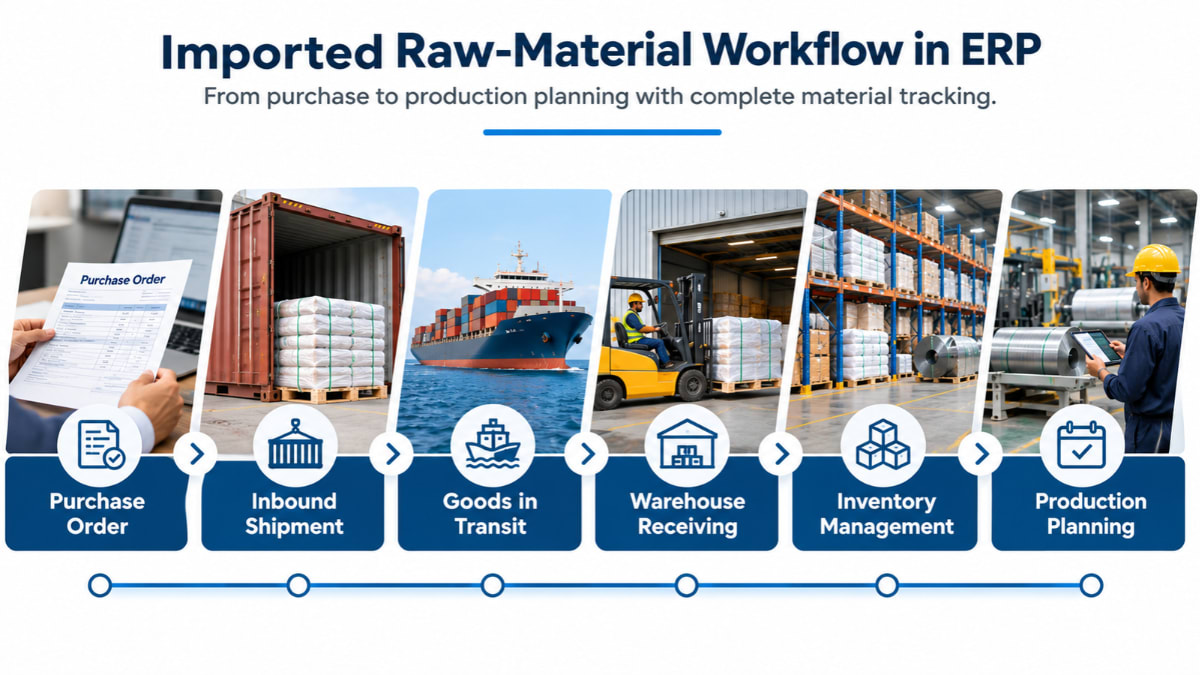
The process generally follows these steps.
Step 1: Create and Manage the Purchase Order
The process begins in the ERP's Purchase module, where the purchasing team creates a purchase order for the required materials.
The purchase order establishes the items and quantities being purchased from a supplier. It also provides a reference for subsequent purchasing and receiving activities.
As the order progresses, purchasing teams need to review outstanding quantities and identify orders that are still awaiting delivery or receipt.
A purchase order tracking report can help users review purchasing activity and identify orders that require further attention.
Step 2: Record the Inbound Shipment
Once the supplier dispatches the materials, the manufacturer needs to maintain the relevant inbound shipment information.
An ERP system with inbound shipment management capabilities provides a way to record and review shipment-related purchasing activity.
This is important when a purchase order involves multiple deliveries or when the manufacturer needs to distinguish between ordered quantities and quantities associated with incoming shipments.
For example, if a manufacturer orders 1,000 units of a raw material but receives the goods in two separate deliveries, the purchasing and receiving records should make it possible to review the outstanding balance without treating the entire order as received.
Step 3: Review Pending Inbound Shipments
Not every inbound shipment will be received immediately. Some shipments remain outstanding while materials are being transported or are otherwise awaiting warehouse receipt.
Manufacturers need a way to review pending inbound shipment records and identify which purchasing activities are not yet complete.
This supports routine follow-up between purchasing and warehouse teams. It also helps prevent teams from assuming that ordered materials are already available for production.
The information available in a pending shipment record depends on the ERP system and how the business configures its purchasing process. Manufacturers should evaluate whether the system captures the shipment details they need for their own operations.
Step 4: Monitor Imported Materials Through Shipment Reports
Reports help purchasing teams review import-related activity without opening individual transaction records one by one.
For example, an import shipment report can provide a consolidated view of recorded import shipment transactions. An item inbound shipment report can help users review inbound shipment activity associated with particular items.
Other purchasing reports, such as purchase order tracking and pending purchase orders for receipt, help identify outstanding purchasing and receiving activity.
Together, these reports give manufacturers a more structured way to review imported material transactions and follow up on incomplete activities.
How Manufacturers Monitor Goods in Transit and Expected Deliveries
One of the most important parts of import management is understanding the difference between ordered materials, goods in transit, and received inventory.
These stages represent different operational conditions.
Ordered: The manufacturer has placed a purchase order, but the materials have not necessarily been dispatched.
Shipped or in transit: The supplier has dispatched the materials, but the manufacturer has not yet recorded their physical receipt.
Received: The materials have arrived and have been recorded through the warehouse receiving process.
Available inventory: The received materials are reflected in the inventory records and can be considered for relevant business activities, subject to any inspection or quality restrictions.
ERP reports help manufacturers review these stages using purchasing, shipment, and receiving records. Manufacturing ERP reports can also help teams investigate operational delays and review production performance.
For example, a purchasing manager can review outstanding purchase orders and pending inbound shipment records to identify materials that have not completed the receiving process. The warehouse team can then reconcile actual deliveries against the relevant records when goods arrive.
However, manufacturers should distinguish between ERP-based shipment record management and live logistics tracking. Recording an inbound shipment does not automatically mean that an ERP system receives real-time vessel positions, container GPS updates, or shipping-line notifications. Those capabilities depend on available integrations and the specific ERP configuration.
The primary benefit of ERP is maintaining connected business records so that teams can understand the purchasing and receiving status of imported materials.
What Happens When Imported Materials Reach the Warehouse?
When imported materials arrive, the receiving process becomes essential. The manufacturer needs to establish whether the delivered items and quantities match the relevant purchasing records. SAP's goods receipt process documentation also describes how purchase orders, inbound deliveries, warehouse putaway, and goods receipt posting fit together.
A structured receiving process generally involves the following activities:
Verify the Delivered Materials
Warehouse personnel check the received items against the purchase order and applicable shipment documentation.
This helps identify differences between the quantities ordered and the quantities physically delivered.
Record the Goods Receipt
Once the delivery has been checked, the receiving activity is recorded in the ERP system.
This creates a transaction record of the materials received and provides a basis for updating inventory.
Handle Partial Deliveries and Differences
Some suppliers may deliver an order in multiple shipments. In other situations, the delivered quantity may differ from the original order.
Manufacturers need to keep the received quantity separate from the outstanding quantity so that purchasing teams can follow up on incomplete deliveries. An organized receiving process also contributes to better manufacturing warehouse efficiency.
Update Inventory Records
After receiving is recorded, the relevant inventory information can be updated.
Inventory reports and item ledger records help manufacturers review stock movements and understand how materials enter and move through the warehouse.
This connection between purchasing and inventory is important because production teams need reliable information about available raw materials rather than relying only on purchase orders or supplier commitments.
How Import Management Supports Production Planning and Inventory Control
Imported materials are directly connected to production planning. If a manufacturer relies on overseas suppliers for essential raw materials, purchasing delays can affect production schedules and order commitments.
ERP helps connect purchasing and inventory information with manufacturing operations.
Improve Raw Material Availability Planning
Production planners need to understand which materials are currently available and which materials are still expected through purchasing activities.
Material availability also needs to be considered alongside production routing and the actual manufacturing process.
By reviewing inventory records alongside outstanding purchasing and inbound shipment information, teams can make more informed decisions about material availability.
This reduces the risk of treating materials that have not yet been received as immediately available stock.
Identify Potential Material Shortages Earlier
Suppose a manufacturer has enough raw material for its current production orders but needs additional quantities for the following production cycle.
If the required materials are still associated with outstanding purchase orders or inbound shipments, purchasing and production teams can review the situation before the next production requirement becomes urgent.
This supports earlier communication between departments and more informed procurement decisions.
Support Better Purchasing Decisions
Historical purchasing and receiving records help manufacturers review supplier performance, purchasing activity, and outstanding deliveries.
Teams can use this information to identify recurring delays, review incomplete orders, and plan future purchasing activities more carefully.
Reduce Excess and Aging Inventory
Importing materials too early or purchasing more than required can create excess inventory. Manufacturers should also understand the hidden cost of aging raw material inventory when planning their purchasing requirements. This may increase storage requirements and tie up working capital.
On the other hand, ordering too late can create material shortages and production delays.
Connecting procurement, inventory, and production planning helps manufacturers make purchasing decisions with a clearer understanding of current stock and upcoming requirements.
What to Look for in ERP Import Management Software
Manufacturers evaluating ERP software for import management should look beyond a basic purchase order module. The system should support the complete purchasing and receiving workflow relevant to their operations.
Consider the following capabilities when evaluating an ERP solution:
Purchase order management: Can the system create, manage, and track purchase orders?
Inbound shipment records: Can users record and review inbound shipments associated with purchasing activity?
Pending shipment visibility: Can teams identify inbound shipments that are still awaiting completion or receipt?
Import shipment reporting: Does the system provide reports for reviewing import shipment transactions?
Purchase order tracking: Can users identify outstanding purchase orders and quantities awaiting receipt?
Receiving management: Can warehouse teams record received materials against relevant purchasing records?
Inventory integration: Do receiving transactions connect with inventory records and stock movements?
Production planning: Can material availability information support production planning and purchasing decisions?
Reporting flexibility: Can the business review purchasing, shipment, receiving, and inventory activity in a useful format?
Business-specific configuration: Can the ERP accommodate the manufacturer's purchasing and import processes?
Manufacturers should also clarify whether they need external logistics integrations. For example, real-time container tracking, shipping-line updates, customs system connections, and automated freight notifications may require separate services or integrations.
Defining these requirements before selecting software helps businesses distinguish between core ERP import management and additional logistics tracking capabilities.
How Multi-Techno ERP Helps Manufacturers Manage Imported Materials
Multi-Techno ERP provides purchasing and inventory capabilities that help manufacturers organize import-related purchasing and receiving activities.
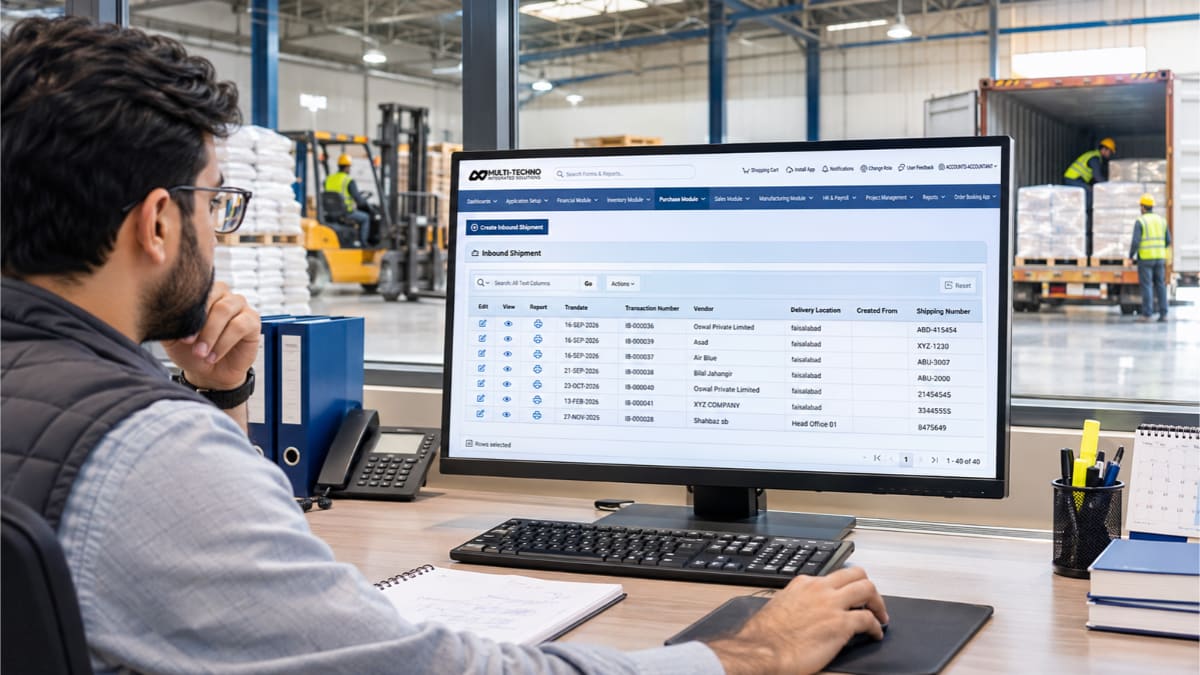
Its Purchase module includes import and shipment tracking functionality, with dedicated options for reviewing inbound shipment activity and import shipment reports.
Relevant Purchase module features include:
Inbound Shipment: Supports the management of inbound shipment records.
Pending Inbound Shipment: Provides a way to review pending inbound shipment activity.
Item Inbound Shipment: Supports reviewing inbound shipment information at the item level.
Import Shipment Report: Helps users review recorded import shipment transactions.
Purchase Order Tracking Report: Supports the review of purchase order activity.
Pending Purchase Order for Receipt: Helps identify purchase orders that are still awaiting receipt.
These features help purchasing teams organize import-related transactions and review outstanding purchasing and shipment activity.
The Inventory module complements this process through inventory transaction records, item ledger information, stock movement, and inventory reporting. This supports the management of materials as they move through warehouse operations.
For manufacturers, the connection between purchasing, inventory, and production management is particularly important. Purchase and receiving information helps teams understand incoming material activity, while inventory and manufacturing processes support material availability and production planning.
The exact workflow and reporting requirements can vary between manufacturers. Businesses should evaluate their purchasing, import, warehouse, and production processes to determine how the ERP should be configured.
If your manufacturing business depends on imported raw materials, Multi-Techno ERP can help bring purchasing, inbound shipment management, and inventory activities into a more organized business workflow.
Frequently Asked Questions
1. What is import management in ERP?
Import management in ERP refers to managing purchasing and inbound shipment activities related to materials sourced from international suppliers. It can include purchase orders, inbound shipment records, pending shipment reviews, import reports, receiving, and inventory updates.
2. How does ERP help manufacturers track imported raw materials?
ERP connects purchasing, shipment, receiving, and inventory records. Manufacturers can review purchase orders, monitor inbound shipment activity, identify outstanding deliveries, record received materials, and use inventory information to support production planning.
3. What is inbound shipment tracking?
Inbound shipment tracking is the process of recording and reviewing goods being transported to a business from suppliers or other sources. In ERP, it generally involves maintaining shipment-related records and connecting them with purchasing and receiving activities.
4. What is the difference between goods in transit and available inventory?
Goods in transit are materials that have been dispatched but have not yet been physically received and recorded by the manufacturer. Available inventory refers to stock recorded in the inventory system and available for relevant business activities, subject to any inspection or quality restrictions.
5. How is an inbound shipment different from a purchase order?
A purchase order records what a manufacturer intends to buy from a supplier. An inbound shipment record relates to the transportation and delivery of goods toward the receiving business. A purchase order can be associated with one or multiple deliveries, depending on the purchasing arrangement.
6. Can ERP help identify delayed imported materials?
ERP can help teams review outstanding purchase orders, pending inbound shipment records, and incomplete receiving activities. This makes it easier to identify transactions requiring follow-up. Automatic delay alerts and real-time carrier updates depend on the system's available functionality and integrations.
7. Does ERP calculate landed costs for imported materials?
Some ERP systems support landed cost management, which can account for additional import-related expenses such as freight, insurance, duties, and other charges. However, the availability and calculation method depend on the ERP system and its configuration. Manufacturers should verify this capability before selecting a solution.
8. How does import management support production planning?
Import management helps manufacturers understand which purchased materials are still outstanding and which have been received into inventory. When this information is considered alongside production requirements, teams can make better-informed purchasing and scheduling decisions.
Conclusion
Manufacturers need more than purchase order records to manage imported materials effectively. They need visibility across the purchasing, inbound shipment, goods-in-transit, warehouse receiving, and inventory stages.
An ERP system helps connect these activities so purchasing, warehouse, and production teams can work with more consistent information. This supports better material planning, clearer receiving records, and more informed procurement decisions.
The complete process can be viewed as:
Purchase Order → Inbound Shipment → Goods in Transit → Warehouse Receiving → Inventory Management → Production Planning
With its Purchase module features for inbound shipments, pending shipments, import shipment reports, and purchase order tracking, Multi-Techno ERP helps manufacturers organize important parts of this workflow within their business management system.
To understand how Multi-Techno ERP can support your manufacturing and import management requirements, contact the Multi-Techno team to discuss your business processes and ERP needs.