Discrete vs Process Manufacturing ERP: Which Model Fits Your Factory?
Choosing a manufacturing ERP is not only about finding software with a production module. The more important question is whether the ERP can represent the way your factory actually produces its products.
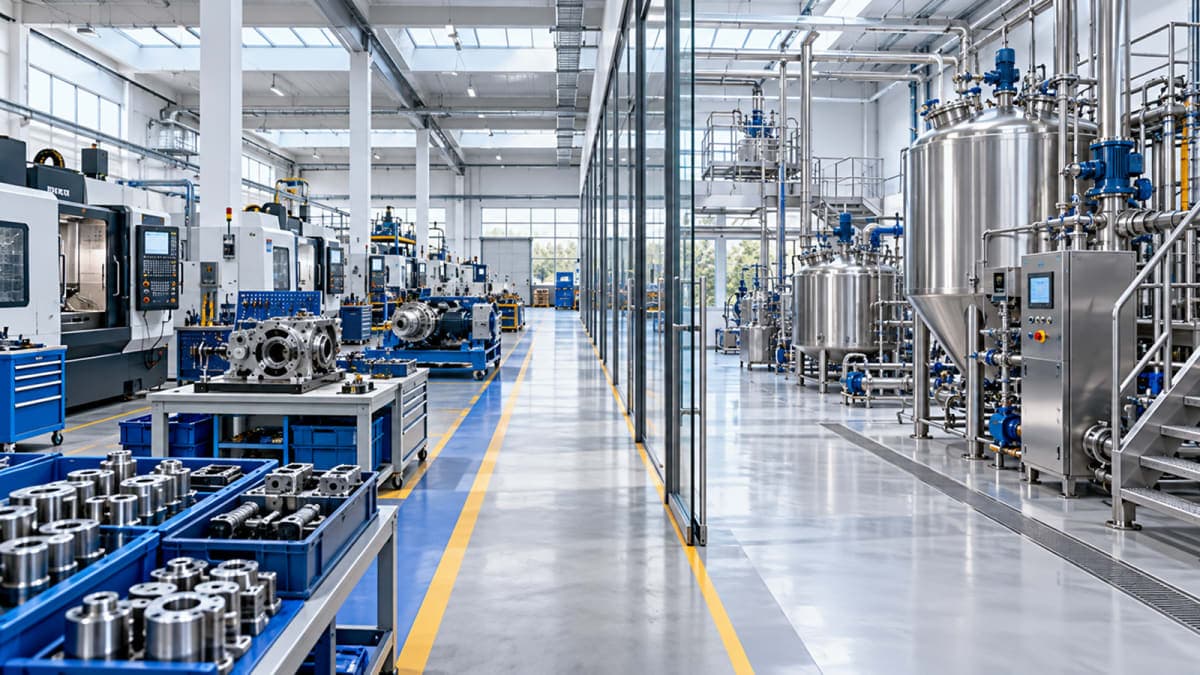
Some manufacturers build identifiable products from individual components. Others transform raw materials through formulas, recipes, batches, or controlled processes. Many factories combine both approaches across different stages of production.
These differences matter because the production model affects how an ERP handles materials, production planning, work orders, costing, inventory, reporting, and traceability.
Understanding whether your factory is primarily discrete, process, or a combination of both can therefore help you evaluate which manufacturing ERP structure fits your operations.
What Is Discrete Manufacturing?
Discrete manufacturing produces identifiable units, assemblies, or finished products from individual components and materials.
A product can usually be separated into its individual parts, and the manufacturing process can be represented through a defined Bill of Material (BOM) and sequence of operations.
Common examples include:
Engineering and machinery
Fabricated products
Automotive components
Electronics
Furniture
Equipment and assemblies
For example, a manufacturer producing industrial equipment may require steel sheets, fasteners, motors, electrical components, and other parts to build one finished machine.
The production process can be represented as:
Raw Materials → Components → Assembly → Testing → Finished Product
The ERP therefore needs to understand what materials are required, which operations are performed, where those operations happen, and what quantity of finished products is produced.
Typical Characteristics of Discrete Manufacturing
Discrete production commonly involves:
Bill of Materials (BOM)
Manufacturing routings
Work centers and machines
Work orders
Assembly operations
Component-level inventory
Production quantities
Production costing
Quality checks
Serial or lot tracking where required
The key idea is that the finished product can generally be identified as a specific unit or group of units built from defined components.
What Is Process Manufacturing?
Process manufacturing works differently.
Instead of assembling separate components into an identifiable unit, raw materials are often transformed, blended, heated, cooled, mixed, refined, or otherwise processed to create another material or finished product.
Common examples include:
Chemicals
Food and beverages
Pharmaceuticals
Paints and coatings
Oils and related products
Certain forms of material processing
Consider a food manufacturer producing a packaged product. Ingredients may be combined according to a specific recipe, processed in batches, and then moved through filling and packaging stages.
The production flow may look more like:
Ingredients → Mixing → Processing → Quality Check → Filling → Packaging
Here, the ERP may need to track formulas or recipes, batch quantities, material consumption, yield, production stages, and lot traceability.
Typical Characteristics of Process Manufacturing
Process manufacturing commonly involves:
Formulas or recipes
Batch production
Material consumption
Yield
Lot and batch tracking
Process stages
Quality control
Production costing
By-products or co-products where applicable
Variable output quantities
The important difference is that production is often measured through quantities, batches, and transformations rather than simply counting individual assembled units.
Discrete vs Process Manufacturing: What Changes in ERP?
The difference between the two production models becomes more important when you look at the ERP behind them.
A manufacturing ERP has to represent the structure of production accurately. If the underlying production model does not match the way the factory operates, employees may end up relying on spreadsheets, manual calculations, duplicate records, or workarounds.
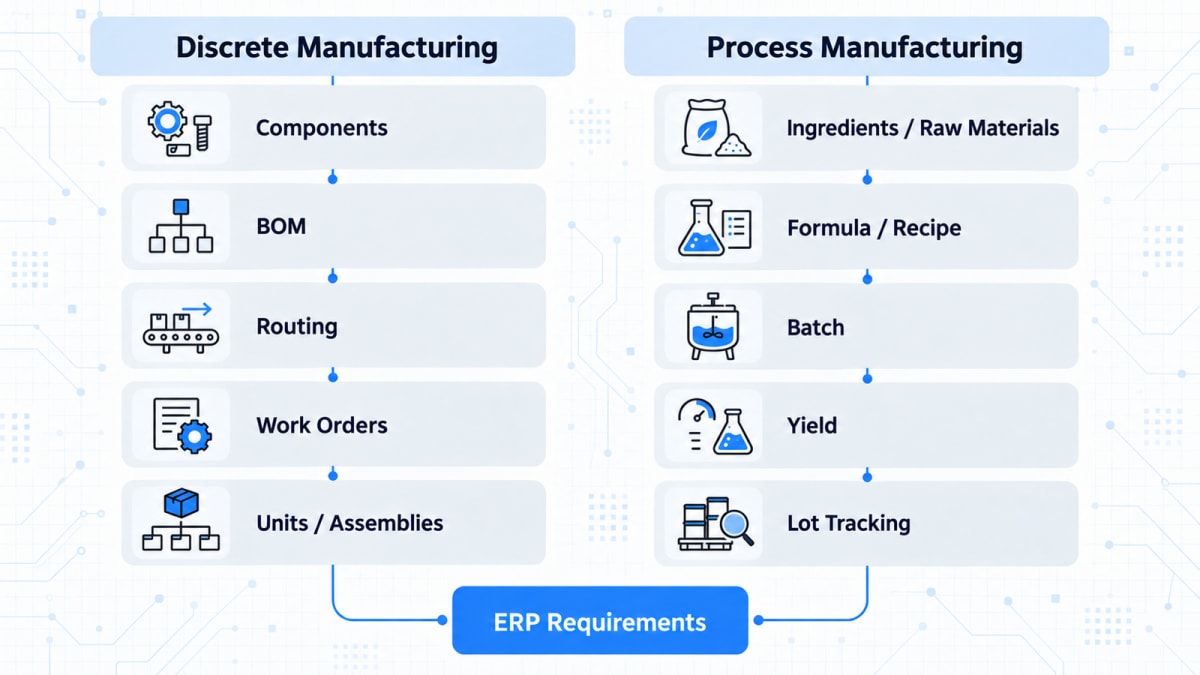
Area | Discrete Manufacturing | Process Manufacturing |
|---|---|---|
Product structure | Bill of Materials | Formula or Recipe |
Production | Individual units or assemblies | Batches or continuous quantities |
Materials | Components and parts | Ingredients or raw materials |
Operations | Defined routing | Process stages |
Output | Countable units | Quantity and yield |
Tracking | Product, serial, or lot | Batch and lot |
Costing | Product and operation based | Material, batch, process, and yield based |
Quality | Product or operation checks | Batch/process checks |
Inventory | Component and finished-product movement | Raw material, intermediate, and finished-product movement |
The underlying production structure is also reflected in mainstream manufacturing ERP systems. Microsoft Learn describes production BOMs as defining components, while routings define operations and work and machine centers represent production capacity and costs.
This does not mean every factory fits perfectly into one column. The table is a way to understand the production structures an ERP may need to support.
What a Discrete Manufacturing ERP Needs to Support
For a discrete manufacturer, the ERP needs to connect the individual parts of production.
A typical structure starts with the Bill of Materials, which defines what is required to make the product.
The manufacturing routing then defines the sequence of operations.
work centers and machines identify where those operations take place.
Finally, work orders bring the requirements together so production can be planned and executed.
This creates a connected production structure:
BOM → Routing → Work Centers → Work Order → Production
For example, an engineering manufacturer may have one product that requires cutting, machining, welding, painting, and final assembly.
Another product from the same factory may skip welding, use a different machine, or require an additional inspection operation.
The ERP needs enough production structure to represent those differences without forcing every product through the same workflow.
What a Process Manufacturing ERP Needs to Support
Process manufacturing requires a different set of relationships.
Instead of simply asking:
Which components are required to assemble this product?
the manufacturer may need to ask:
Which materials, quantities, process conditions, and production stages are required to produce this batch?
The ERP may therefore need to manage:
Formulas or recipes
Batch sizes
Material consumption
Actual versus planned consumption
Yield
Batch numbers
Lot traceability
Quality checks
Process stages
Intermediate materials
Production costs
This becomes particularly important when raw materials, work-in-progress, and finished goods move through multiple production stages and require accurate inventory tracking.
For example, if a production batch produces less output than expected, the ERP should be able to connect the actual material consumption and output to that batch.
That information becomes important for costing, inventory control, quality analysis, and production reporting.
What If Your Factory Uses Both? The Hybrid Manufacturing Case
Not every factory can be classified as purely discrete or purely process.
Some businesses use different production models at different stages of their operations.
A textile manufacturer is a good example.
One part of the operation may involve transformation or treatment of materials, while another stage may produce identifiable rolls, cut pieces, finished garments, or packaged products.
A similar situation can occur when a manufacturer processes raw material into an intermediate product and then performs discrete assembly or packaging.
The production flow might look like:
Process Production → Intermediate Material → Discrete Production → Finished Product
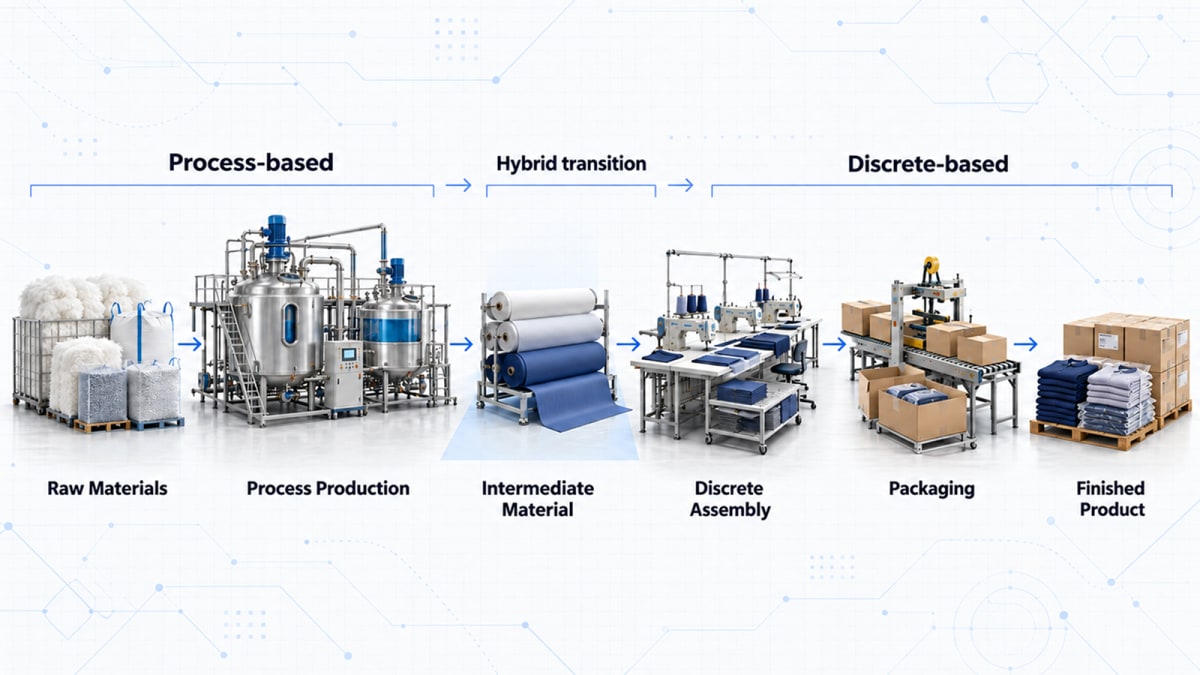
In these situations, choosing an ERP based on a single label can be misleading.
The better question is:
Can the ERP support the different production structures that exist within the factory?
This is where hybrid manufacturing capabilities become important.
Why the Wrong ERP Model Can Create Operational Problems
The problem with choosing an ERP based only on the presence of a “manufacturing module” is that two systems can both have manufacturing functionality while representing production very differently.
A factory may need to manage:
Different production routes
Multiple production stages
Batch or unit-based output
Intermediate products
Material consumption
Work-in-process
Production costs
Quality checks
Lot or serial tracking
Production reporting
If the ERP does not naturally support the required structure, the business may have to create workarounds.
For example, a production team may maintain information in spreadsheets because the standard workflow does not capture a specific requirement. Finance may then need separate calculations for actual production costs. Management may receive reports that require additional manual consolidation.
The issue is not that one ERP model is universally better than another.
The issue is fit between the ERP's production structure and the factory's actual process.
Which Manufacturing Model Fits Your Factory?
Before evaluating ERP software, ask a few practical questions about your own production.
1. Are your finished products individually identifiable?
If production is primarily based on identifiable units, assemblies, or products made from components, you may have a predominantly discrete manufacturing structure.
2. Do you produce through formulas, recipes, or controlled transformations?
If raw materials are blended, processed, converted, or transformed according to defined formulas or recipes, process manufacturing characteristics may be more important.
3. Is production measured in units or batches?
Unit-based production generally points toward discrete manufacturing.
Batch sizes, variable yield, and quantity-based output are more commonly associated with process manufacturing.
4. Do you need batch or lot traceability?
If knowing which raw-material lot went into a production batch is critical, the ERP needs to support that level of traceability.
5. Does your production use different workflows?
If different products follow significantly different production sequences, routing and workflow flexibility become important.
6. Does one factory use both models?
If the answer is yes, look for an ERP that can support both production structures rather than forcing the entire operation into one model.
What Should You Look for in a Manufacturing ERP?
A manufacturing ERP system should then be evaluated not only on its production features, but also on how production connects with inventory, procurement, finance, quality, and reporting.
A discrete manufacturer may place greater importance on:
BOM management
Routing
Work centers
Machines
Work orders
Assembly and production tracking
Component inventory
Production costing
A process manufacturer may place greater importance on:
Formulas and recipes
Batch production
Material consumption
Yield
Lot tracking
Quality control
Process costing
Batch-level reporting
If your production structure includes specialized workflows that standard functionality cannot represent effectively, understanding when custom manufacturing ERP becomes relevant can help with the next stage of ERP evaluation.
The important point is not to select an ERP because it has the longest feature list. It is to determine whether the system can represent the production relationships your factory actually depends on.
How Multi-Techno Supports Different Manufacturing Requirements
Manufacturing requirements can vary significantly between industries and even between factories within the same industry.
Multi-Techno Production Management module supports production setup through BOMs, routings, work centers, machines, work orders, production planning, and production reporting. Its production management capabilities also support both discrete and process manufacturing workflows.
This allows manufacturers to structure production around their actual operational requirements rather than treating every factory as if it follows the same production model.
For businesses with more specialized requirements, ERP functionality can also be extended through custom development where standard functionality does not fully represent a particular workflow.
The goal is not to customize every part of an ERP.
The goal is to use standard capabilities where they fit and extend the system where the actual production requirement calls for something different.
A Practical ERP Selection Checklist
Before choosing a manufacturing ERP, document your production flow from raw material to finished product.
Ask:
Materials
What raw materials and components are required?
Are they managed individually or by formula/recipe?
Production
Are products assembled or transformed?
Is production unit-based, batch-based, or both?
Operations
What production stages exist?
Do different products follow different routes?
Resources
Which machines, work centers, or production areas are involved?
Are resources shared between products?
Tracking
Do you need serial numbers, lot numbers, or batch traceability?
Costing
How do you calculate production costs?
Do yield and actual material consumption affect the final cost?
Reporting
Which production metrics does management need?
Can the ERP produce those reports directly from production data?
If these questions are clearly mapped before ERP selection, it becomes much easier to identify whether a system actually fits the factory.
Frequently Asked Questions
What is the difference between discrete and process manufacturing?
Discrete manufacturing generally produces identifiable units or assemblies from components, while process manufacturing transforms materials through formulas, recipes, or production processes, often in batches.
What is a discrete manufacturing ERP?
A discrete manufacturing ERP is designed to manage production based around products, components, BOMs, routings, work centers, work orders, and identifiable production outputs.
What is a process manufacturing ERP?
A process manufacturing ERP manages production involving formulas or recipes, batches, material consumption, yield, process stages, quality, and lot traceability.
Can one factory use both discrete and process manufacturing?
Yes. A factory may use process-based operations in one production stage and discrete production in another. In such cases, the ERP needs to support the different workflows involved.
Is textile manufacturing discrete or process manufacturing?
Textile manufacturing can involve characteristics of both models depending on the production process. Some stages may involve material transformation, while others may involve identifiable products, rolls, garments, or packaging.
How does production type affect ERP selection?
Production type affects the way an ERP needs to handle materials, production orders, routing, batches, costing, inventory, quality, and reporting. Understanding the production model helps determine which ERP capabilities are actually required.
What should manufacturers check before choosing an ERP?
Manufacturers should map their materials, production stages, workflows, resources, tracking requirements, costing methods, reporting needs, and whether their factory uses discrete, process, or hybrid production.
Final Thoughts
The difference between discrete and process manufacturing is more than a terminology question.
It affects how production is structured, how materials are consumed, how output is measured, how costs are calculated, and how production information moves through the ERP.
For some factories, a discrete manufacturing structure may be the natural fit. For others, process manufacturing may better represent the operation. And for many manufacturers, the answer may involve both.
That is why ERP selection should start with the factory's production model rather than the software's feature list.
Understand how your factory produces. Then choose an ERP that can represent it.
Talk to us to discuss which manufacturing ERP model fits your production requirements.