Custom Manufacturing ERP for Complex Production Processes
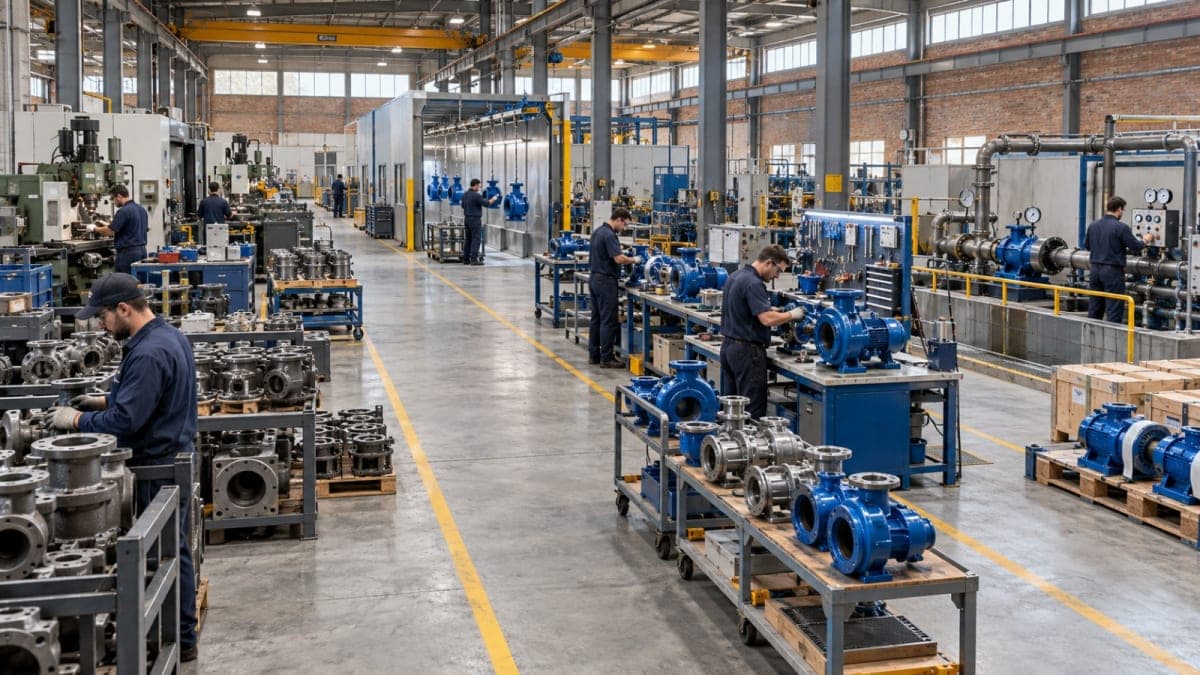
Manufacturing processes do not always follow a fixed pattern. As a factory grows, it may introduce multiple production stages, different manufacturing methods, shared resources, product-specific operations, or workflows that do not fit neatly into a standard ERP structure.
This is where the difference between a standard manufacturing ERP and a configurable or custom ERP approach becomes important.
A standard ERP can work well when production follows relatively consistent processes. But when the factory has specific requirements that cannot be represented effectively through standard workflows, customization can allow the ERP to better reflect how production actually works.
Why Production Complexity Changes ERP Requirements
A simple manufacturing process may be easy to represent in an ERP:
Raw Materials → Production → Finished Goods
But real production environments can be considerably more complicated.
A manufacturer may have:
Multiple production stages
Different routes for different products
Shared machines between production lines
Intermediate or semi-finished products
Rework and inspection stages
Different production methods within the same business
Product-specific manufacturing operations
Special production reporting requirements
As these requirements increase, the question changes from:
“Does the ERP have a manufacturing module?”
to:
“Can the ERP represent how our manufacturing process actually works?”
That distinction matters when selecting a manufacturing ERP for a complex production environment.
The Building Blocks of a Manufacturing ERP
Before comparing standard and custom ERP approaches, it helps to understand the basic building blocks of manufacturing management.
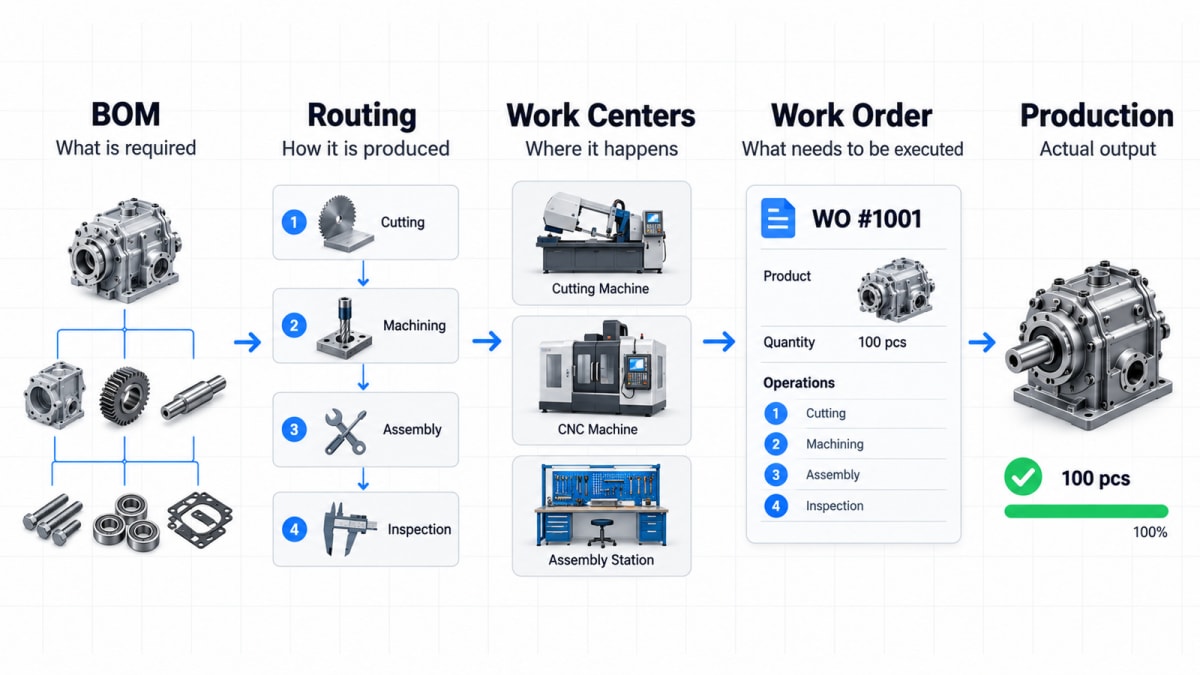
Bill of Materials
A Bill or Materials (BOM) defines the materials and components required to produce a finished or semi-finished product.
For a simple product, this may be a straightforward list of raw materials.
For a more complex product, the BOM may contain multiple levels, subassemblies, components, and material requirements.
Manufacturing Routing
Manufacturing Routing defines the sequence of operations required to produce the product.
For example:
Cutting → Machining → Welding → Finishing → Assembly
Different products may require different sequences, operations, or production resources.
Microsoft Learn similarly describes routings as the sequence of steps or operations required to produce a product, alongside work centers and machine centers used in manufacturing.
Work Centers
Work centers connect production operations with the areas or resources where those operations take place.
A factory may have separate work centers for cutting, machining, welding, painting, assembly, or other operations.
Work Orders
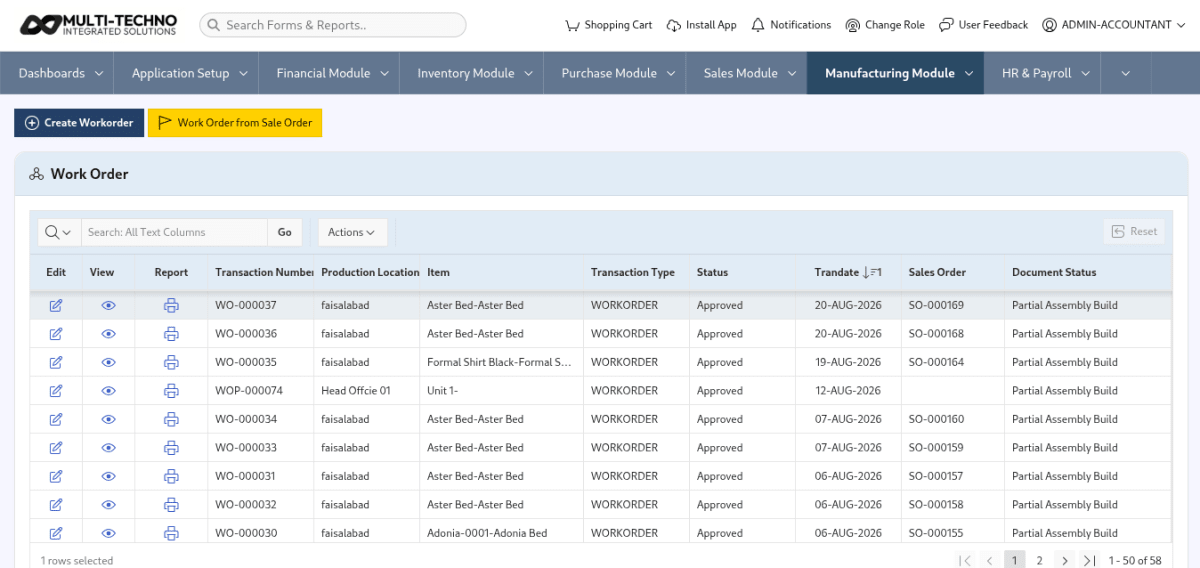
Work orders bring the production requirements together for execution.
They can connect the product, required materials, production operations, resources, and quantities into an executable manufacturing process.
These building blocks work together. The more specialized the production environment becomes, the more important it is that the ERP can connect them according to the manufacturer's actual process.
Where Standard Manufacturing ERP Can Become Restrictive
Off-the-shelf ERP is not inherently unsuitable for manufacturing.
For businesses with relatively standard production processes, predefined workflows can provide exactly what is needed.
The challenge appears when the factory's requirements move beyond those predefined structures.
A standard system may provide a defined way to:
Create products
Define BOMs
Create routings
Assign work centers
Generate work orders
Record production
Produce standard reports
But a manufacturer may need those processes to work differently because of its own production model.
If the system cannot accommodate the requirement through configuration, users may have to rely on workarounds, manual processes, separate spreadsheets, or changes to their established workflow.
The issue is therefore not whether standard ERP is good or bad.
It is whether the standard process matches the actual production process.
Three Production Scenarios Where Flexibility Matters
Certain manufacturing environments make this difference particularly clear.
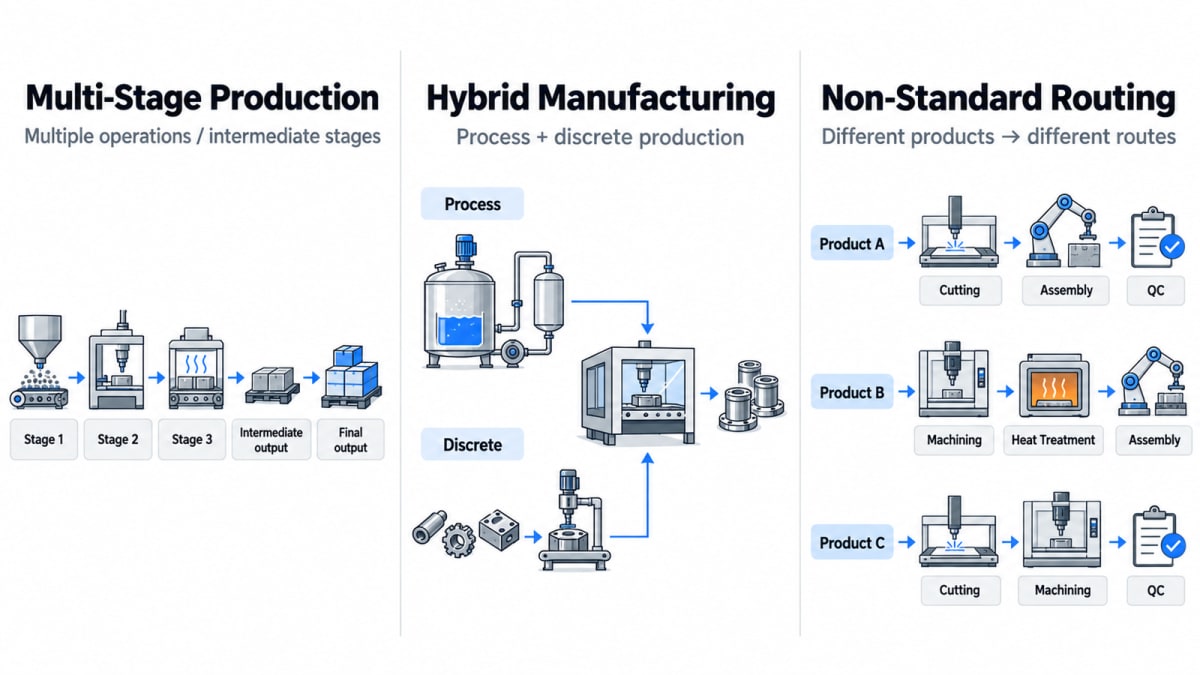
1. Multi-Stage Production
Some products pass through several distinct production stages before becoming finished goods.
For example:
Raw Material → Cutting → Forming → Machining → Assembly → Finishing → Inspection
An intermediate output from one stage may become the input for another.
The production process may also involve:
Different machines at different stages
Quality checks between operations
Intermediate inventory
Rework
Different production times
Multiple work centers
In such an environment, the ERP needs to maintain the relationship between materials, operations, resources, and work orders across multiple stages.
If the standard workflow does not accommodate the manufacturer's actual sequence or tracking requirements, additional configuration or customization may become necessary.
2. Hybrid Discrete and Process Manufacturing
Some businesses do not operate under one pure manufacturing model.
For example, a manufacturer may use a process-based method for producing a material and then use discrete assembly operations to convert that material into finished products.
The overall workflow could look like:
Process Production → Intermediate Material → Discrete Assembly → Finished Product
The business may therefore need different production structures within the same ERP environment.
A rigid production workflow can become difficult to manage when the system assumes that every product should follow the same manufacturing model.
A configurable ERP can provide more flexibility when different production methods need to work together.
3. Non-Standard Production Routing
Not every product necessarily follows the same production route.
Consider a factory where Product A requires:
Cutting → Welding → Painting → Assembly
while Product B requires:
Cutting → Machining → Heat Treatment → Assembly
Another product may require an additional inspection stage or a different sequence altogether.
The ERP needs to distinguish between these production routes rather than forcing every product into one standard workflow.
This is where flexible routing, work-center structures, production operations, and work-order configuration become important.
What Does “Custom ERP” Actually Mean?
The term custom ERP can sometimes create the impression that a completely new ERP system must be developed from the ground up.
That is not necessarily what customization means.
For many manufacturing businesses, a practical custom ERP approach starts with an existing ERP foundation and adapts it to specific business requirements.
This can include:
Configuring existing modules
Adjusting workflows
Adding required fields
Creating custom reports
Extending production processes
Connecting external systems
Adding industry-specific functionality
Modifying screens or user interfaces
Developing functionality that is not available in the standard setup
Where a requirement goes beyond the ERP's existing functionality, custom application development can be used to extend the broader business workflow. The objective is not to rebuild everything.
The objective is to close the gap between what the standard ERP provides and what the business actually needs.
Customization vs Building an ERP From Scratch
These two approaches are not the same.
Custom-Configurable ERP | ERP Built From Scratch |
|---|---|
Starts with an existing ERP foundation | Starts with a new software architecture |
Uses existing modules where possible | Every major function must be developed |
Adds or changes specific functionality | Entire system is developed around requirements |
Can reduce unnecessary development | Requires substantially more development |
Focuses customization on business requirements | Provides complete control over the software |
For many businesses, the practical approach is not to replace everything with custom development.
Instead, standard ERP functionality can be retained where it already works, while specific areas can be configured or extended where the business has unique requirements.
How Multi-Techno Approaches Custom Manufacturing ERP
Multi-Techno's approach is based on combining an established ERP foundation with configurable modules and custom development where required.
This means a manufacturing business does not necessarily need an entirely separate ERP built from zero.
Standard capabilities in Production Management can handle common manufacturing requirements, while specific production or operational requirements can be addressed through configuration and customization.
For example, a business may use standard functionality for:
Accounting
Inventory
Sales
Purchasing
Basic production management
while requiring additional customization for:
Specialized production workflows
Industry-specific operations
Custom reporting
External integrations
Unique approval processes
Product-specific requirements
This approach allows the ERP to remain connected across the business while adapting specific areas to the manufacturer's requirements.
When Does a Manufacturer Actually Need Customization?
Not every manufacturer needs a custom ERP.
If a factory has relatively straightforward production processes and its requirements are already supported by a standard manufacturing ERP, customization may add unnecessary complexity.
Customization becomes more relevant when the business has requirements such as:
Requirement | Why Flexibility May Matter |
|---|---|
Multiple production models | Different processes may need different workflows |
Non-standard routing | Products may follow different operation sequences |
Complex production stages | Intermediate outputs and multiple stages require coordination |
Shared production resources | Machines or work centers may serve different products |
Specialized reporting | Standard reports may not capture required production information |
External integrations | Production may need to exchange data with other systems |
Industry-specific workflows | Standard ERP processes may not reflect the business model |
The key is to identify the gap between the standard ERP and the actual requirement before deciding that customization is necessary.
A Simple Way to Evaluate Your ERP Requirement
Before choosing between standard and custom manufacturing ERP, map your production process.
Start with:
What are we producing?
Then identify:
What materials are required?
Next:
What operations are performed?
Then:
Where does each operation happen?
After that:
Which machines or resources are involved?
Finally:
How does the production process need to be tracked and reported?
This creates a practical chain:
BOM → Routing → Work Centers → Machines → Work Orders → Production Reporting
If every part of this chain fits naturally into the ERP, a standard configuration may be sufficient.
If important parts require workarounds or cannot be represented properly, that is where customization should be evaluated.
Custom ERP Should Solve a Business Requirement
Customization should not be treated as a feature checklist.
Adding a custom field simply because it is possible does not necessarily improve manufacturing management.
A useful customization should solve a specific operational problem.
For example:
Problem: Production managers need a report that combines information from multiple production stages.
Possible solution: Create a production report that brings the required information together instead of forcing managers to compile it manually.
Or:
Problem: Different product categories require different approval or production workflows.
Possible solution: Configure the workflow so that each product category follows the required process.
The question should always be:
What business problem does this customization solve?
That keeps the ERP focused on operational value rather than unnecessary complexity.
What About Future Production Changes?
Manufacturing processes rarely remain completely unchanged.
A company may:
Add a new production line
Introduce new products
Purchase new machines
Add a production department
Change routing
Introduce new quality stages
Expand into another manufacturing method
Integrate new business systems
An ERP structure that works today should therefore also be considered in terms of how easily it can adapt to future requirements.
This does not mean every possible future scenario needs to be customized today.
It means the ERP should provide enough flexibility that reasonable changes do not require rebuilding the entire system.
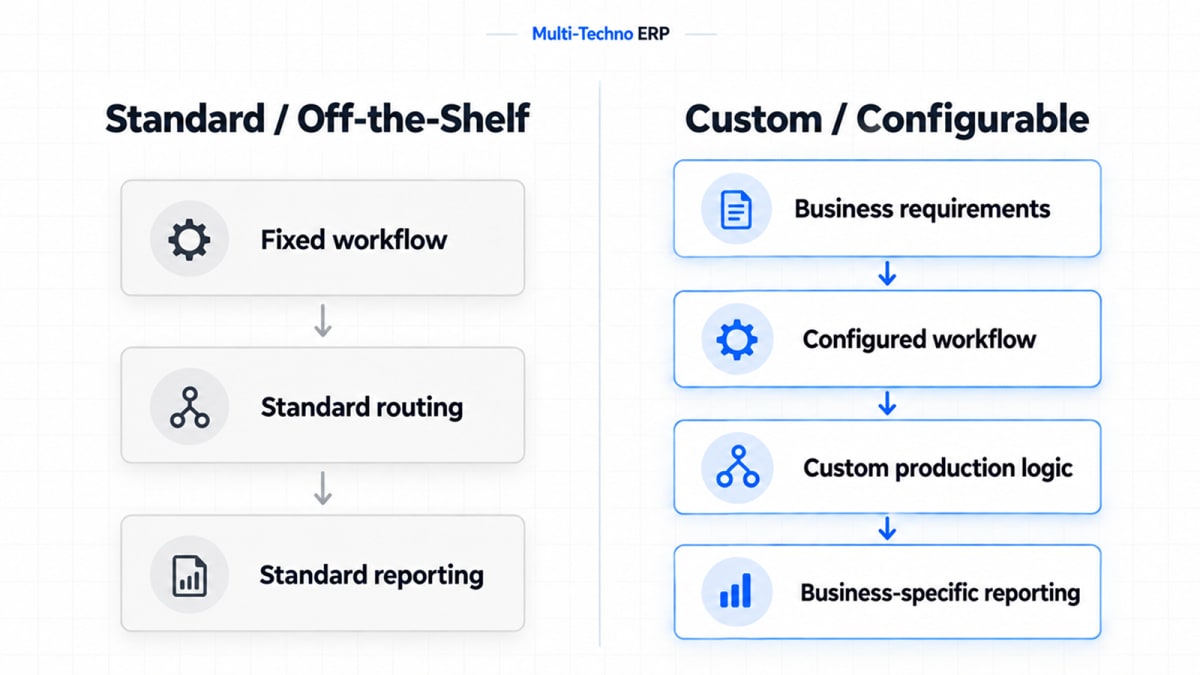
Custom Manufacturing ERP vs Off-the-Shelf ERP
The decision is ultimately about the relationship between the software and the production environment.
Area | Off-the-Shelf ERP | Custom-Configurable ERP |
|---|---|---|
Standard processes | Strong fit where requirements are common | Can also use standard processes |
Production structure | Works best when factory structure matches the system | Can be adapted to specific structures |
Routing | Usually follows supported routing models | Can be extended for specialized requirements |
Work centers | Uses available resource structures | Can accommodate additional requirements |
Reporting | Standard reports and available configurations | Can include business-specific reporting |
Integrations | Depends on available connectors and APIs | Can be extended for specific integration needs |
Unique workflows | May require workarounds if unsupported | Can be configured or developed around the requirement |
Future changes | Depends on standard product capabilities | Can provide additional flexibility through customization |
Neither approach needs to be evaluated in isolation.
The more useful question is:
How closely does the ERP fit the way your business actually operates?
A Practical Decision Framework
Before choosing an ERP, compare your requirements against the standard system.
Standard ERP may be sufficient when:
Production processes are relatively consistent.
Standard BOM structures meet your requirements.
Routing requirements are straightforward.
Available work-center structures match your factory.
Standard reports provide the required information.
Existing integrations meet your needs.
Customization may be worth evaluating when:
Production follows multiple specialized workflows.
Products require significantly different routes.
The factory combines different manufacturing methods.
Standard workflows require repeated workarounds.
Business-specific reporting is essential.
Production needs to integrate with other specialized systems.
The factory's operational structure does not fit the standard ERP model.
This approach keeps the decision based on actual requirements rather than assuming that customization is automatically necessary.
Why Production Should Drive the ERP Structure
For manufacturing businesses, ERP selection should start with the production process rather than the software interface.
The important questions are operational:
How is the product made?
How does material move through production?
Which resources are involved?
Which operations can vary?
What information does management need to monitor?
Once these questions are clear, it becomes easier to determine whether standard ERP functionality is sufficient or whether specific areas require configuration or customization.
The ERP should support the production model rather than forcing the production team to create workarounds around the software.
Frequently Asked Questions
What is a custom manufacturing ERP?
A custom manufacturing ERP is an ERP system that is configured or extended to meet specific manufacturing requirements beyond what standard functionality provides.
Is custom ERP better than off-the-shelf ERP?
Not necessarily for every business. Standard ERP can be suitable when its existing manufacturing workflow match the company's requirements. Customization becomes relevant when important business or production requirements cannot be handled effectively through standard functionality.
When does a manufacturing business need a custom ERP?
Customization may be worth evaluating when a business has complex production stages, non-standard routing, multiple manufacturing models, specialized reporting, unique workflows, or integration requirements that standard ERP functionality cannot adequately support.
Can custom ERP handle multiple production processes?
Yes. A configurable ERP can be structured to support different production workflows, routing requirements, work centers, and operational processes based on the business's manufacturing model.
Does custom ERP mean building everything from scratch?
No. Custom ERP can start with an existing ERP foundation and extend or configure only the areas that require changes. This can avoid unnecessary development of functionality that the ERP already provides.
Can a manufacturing ERP be customized later?
Depending on the ERP architecture and development approach, additional functionality can often be introduced as business requirements change. The available options depend on the system's technology and design.
Is customization necessary for every manufacturing company?
No. Businesses with straightforward production requirements may be well served by a standard manufacturing ERP. Customization should be considered when there is a clear gap between standard functionality and actual business requirements.
Final Thoughts
Manufacturing complexity is not simply about having more products, machines, or employees.
It is about how many different relationships exist between materials, operations, production resources, work orders, and business processes.
A standard manufacturing ERP can handle many common production requirements. But when a factory operates with specialized workflows, multiple production models, non-standard routing, or business-specific reporting, the ability to configure and extend the ERP becomes increasingly important.
That is where a custom manufacturing ERP approach can make a practical difference.
The goal is not to customize everything.
The goal is to use standard ERP functionality where it fits and customize the areas where the actual production process requires something different.
Get a Free Demo for Your Production Requirements
Explore how Multi-Techno can structure ERP around your production processes, from BOMs and routing to work centers, work orders, reporting, and specialized manufacturing requirements.
Get a Free Demo and discuss your production environment with the Multi-Techno team.